
Version 8.x
8.11.0:
New Features
-
Age attribute for workflows
-
The new
ageattribute for Pull Requests lets you run actions depending on how long the pull request has stayed open, or have merge checks preventing from merging too old or too new pull requests. -
Can you show me an example?
Below, we have two workflows that will add a comment after the pull request has been open for 7 days, and it will prevent merging during the first hour after it was openYAMLworkflows: - name: Message when PR is old conditions: - age > duration('7 days') actions: - add-comment: content: Time to close? - name: Don't merge too soon merge-checks: - title: Wait 1 hour checks: - age > duration('1 hour')
-
-
Action to suggest description
-
The new
suggest-descriptionaction can be used to automatically add a description and/or title template when developers create a pull request. -
Can you show me an example?
The following workflow will pre-fill the description text area with a possible description structureYAMLworkflows: - name: Description suggestion actions: - suggest-description: description: | # WHAT # WHY Jira work items: ${join(jira-keys, ' ')}
-
-
Action to decline pull request
-
The new
declineaction will automatically decline a pull request. This can be used, e.g., with the newageattribute (see above) to decline pull requests that became too old. -
Can you show me an example?
This will decline pull request older than 7 daysYAMLworkflows: - name: Auto decline conditions: - age > duration('7 days') actions: - decline: comment: Pull request stayed open for too long
-
Bug fixes
-
Code Owners merge checks involving only unlicensed users will no longer be ignored, and will be applied properly.
8.9.0:
New Features
-
Report results of Add Reviewers action
-
add-commentaction can now report the results of other actions previously occurring in the same workflow. -
Why? Continuing our work to split up the
add-codeownersaction into fine-grained features, we have reintroduced the commenting functionality via theadd-commentaction.-
Can you show me an example?
-
below you can see the new
report-fromoption that accepts a key associated with a previous action in the workflow. For now onlyadd-reviewersis a valid key, but we hope to expand the options in the future.YAML# This would be added within a workflow actions: - add-reviewers: members: codeowners assignment-routing: random: 1 - add-comment: report-from: add-reviewers task: falseThis will result in the same comment behavior that you may already use with CODEOWNERS file or the previous
add-codeownersaction: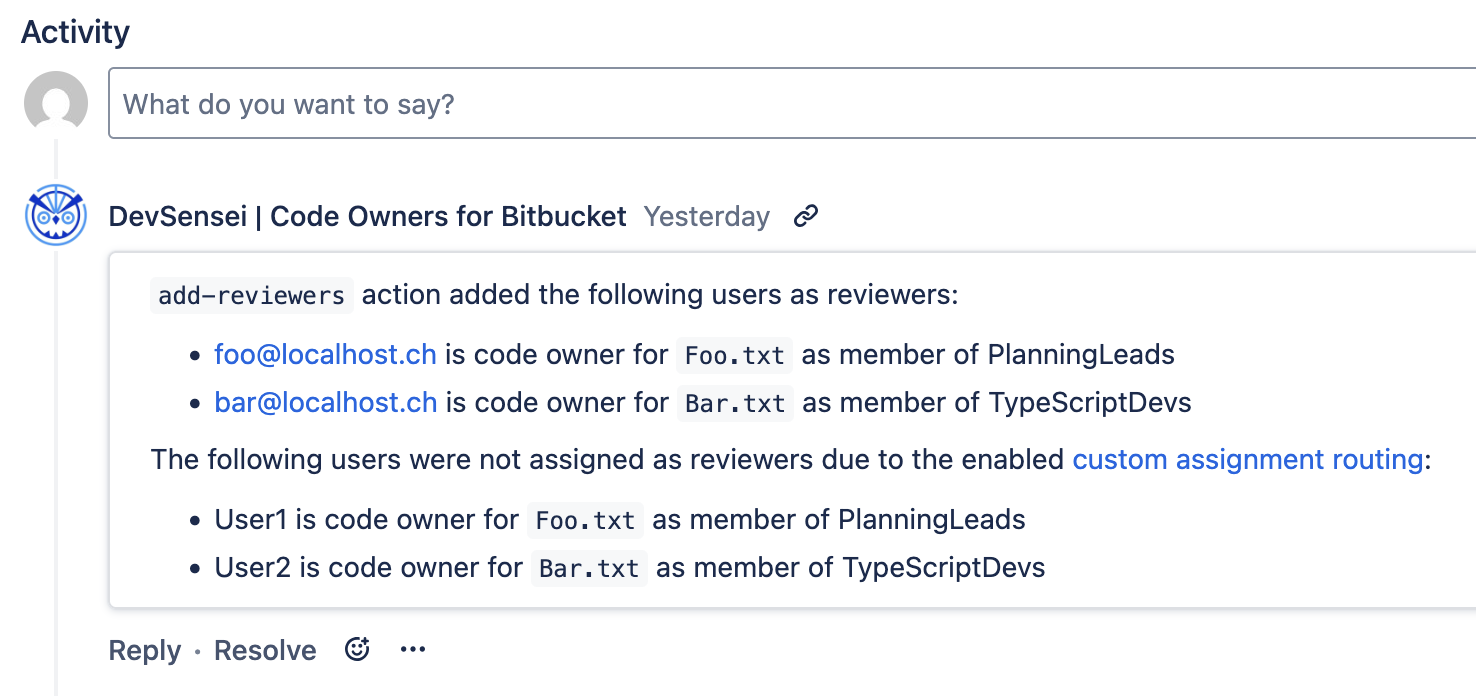
-
-
-
-
Change to automatic CODEOWNERS migration
-
The automatic process to migrate a CODEOWNERS file, accessible from the in-app DevSensei Documentation, now produces a workflow with a mixture of
add-reviewers,add-commentandunapproveactions in theactionssection,codeownersandcustom-groupsin thecustom-attributessection, andcodeowners-checkin themerge-checkssection.This change makes each individual configuration more regular with the rest of DevSensei, unlike the irregular
add-codeownersaction which combined many separate features.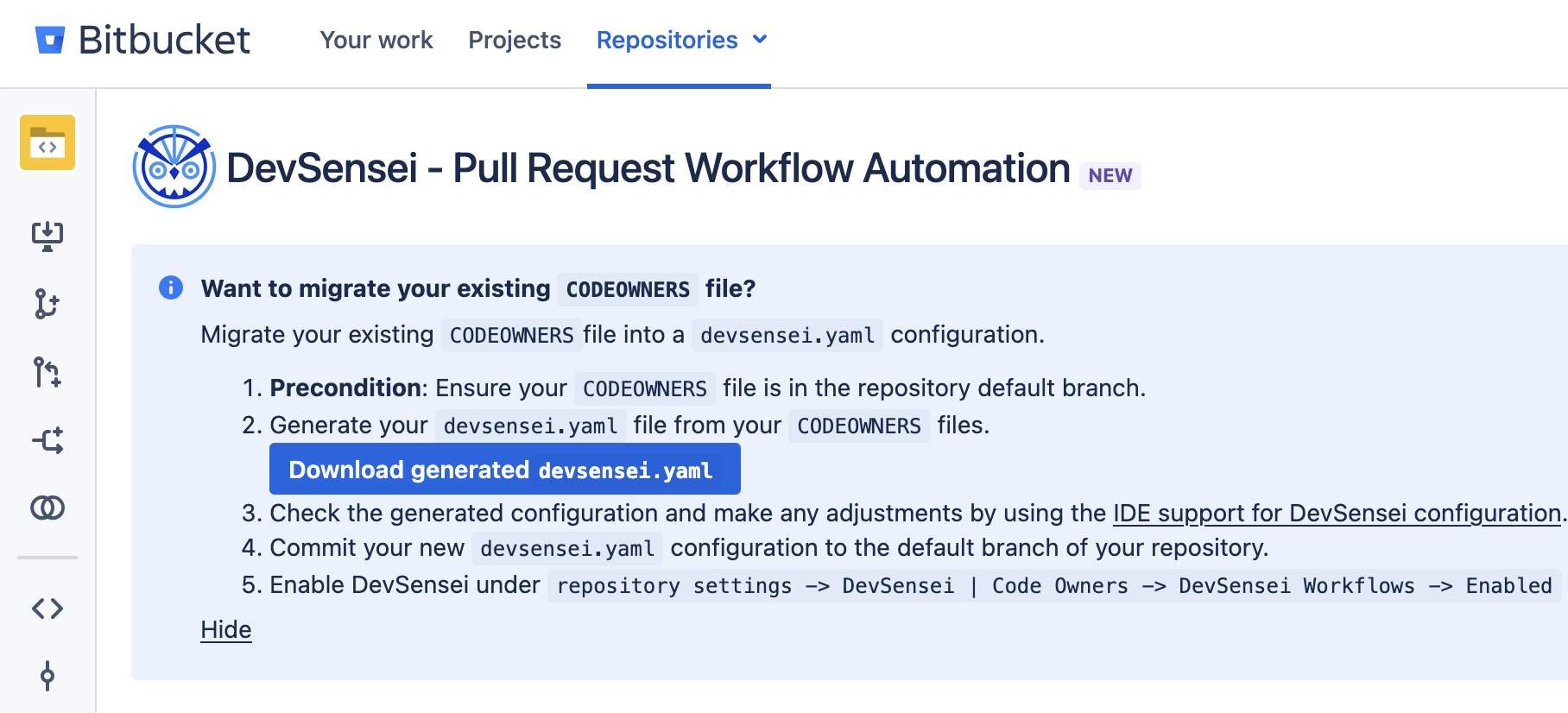
-
8.8.1:
Bug Fixes
-
Restore functionality of automatic reviewer suggestions in the “Create Pull Request” page
-
Fix positioning of Code Owners information in the “Create Pull Request” page
-
Add visibility of warnings for invalid identifiers when using the
add-reviewersaction.
8.8.0:
⚠️ Announcements
-
Support for Bitbucket 10
-
The app is now compatible with the recently released Bitbucket 10.0.
-
New Features
-
Custom Attributes
-
We are introducing a new feature to enhance your Workflows: custom attributes. Custom attributes are a way to add information to your Pull Requests based on the specificities of your own team and processes. Custom Attributes are available to use within the actions and merge checks that support them.
-
Why? DevSensei comes with a growing number of attributes to retrieve information from the Pull Request and use them within Workflow conditions or to build custom merge checks. All these attributes don’t depend on anything else than the pull request (for example, the title or the current approvals). However, other kinds of attribute would depend on how you work. For example, what users are responsible to review it (Code Owners).
In this release, we add the two first available custom attributes:
-
Custom groups
-
Code Owners
-
-
Custom groups
-
Custom groups are similar to Bitbucket groups, but they are tied to your pull requests workflows.
-
Can you show me an example?
-
Here is a custom groups definition with three teams,
frontend-devs,backend-devsandall-devsYAML# This would be added within a workflow custom-attributes: custom-groups: frontend-devs: - alice - bobby backend-devs: - charly@domain.com - denise all-devs: - @@frontend-devs - @@backend-devs
-
-
-
Code Owners
-
We are making Code Owners first class citizens within your DevSensei workflows.
-
Why? Prior to DevSensei 8.8.0, the
add-codeownersaction was a monolithic action lacking flexibility (albeit having a certain number of options). It was also “magically” adding merge checks. We are thus moving the definition of the Code Owners rules as part of a custom attribute. -
Can you show me an example?
-
Here is the definition of Code Owners that reference custom groups (
frontend-devsandbackend-devs) and a Bitbucket or reviewer group (admins)custom-attributes: # [... custom groups as above] codeowners: rules: | * @alice bobby@domain.com frontend/ @@frontend-devs backend/ @@backend-devs devsensei.yaml @@admins
-
-
-
-
DevSensei Workflow Action:
add-reviewers-
We add a new action to automatically add reviewers to your pull requests. The added reviewers can be individuals, groups (Bitbucket, reviewer or custom groups) or the defined Code Owners.
-
Why? Automatically adding the right persons as reviewers enhances the quality of your Pull Requests and fasten their creation.
-
Can you show me an example?
-
Here is a workflow adding the
frontend-devsgroup (see above) when files from the frontend directory are modifiedYAMLworkflows: - name: Add Frontend devs conditions: - changed-files ~= 'frontend/' custom-attributes: custom-groups: frontend-devs: - alice - bobby actions: - add-reviewers: members: - @@frontend-devs -
Here is a workflow using the custom
codeownersattributesYAMLworkflows: - name: Add Code Owners conditions: - changed-files ~= 'frontend/' custom-attributes: custom-groups: frontend-devs: - alice - bobby backend-devs: - charly@domain.com - denise codeowners: rules: | frontend/ @@frontend-devs backend/ @@backend-devs devsensei.yaml @@admins actions: - add-reviewers: members: codeowners
-
-
-
DevSensei Workflow Action:
add-watchers-
The
add-watchersaction is similar to theadd-reviewersaction but adds the configured people as pull request watchers instead of reviewers. -
Why? Some people need to be kept informed about what is happening in your repositories, without talking an active role in it. Use the
add-watchersattribute to let people know about your changes. -
Can you show me an example?
-
Here is a workflow adding the QA team as watchers to your pull requests
YAMLworkflows: - name: Keep QA team in the loop actions: - add-watchers: members: - @@qa-team
-
-
-
DevSensei Workflow Merge Check:
codeowners-check-
Configured Code Owners can also be used to define merge checks requiring some (or all) of the active Code Owners to approve the Pull Request.
-
Why? Adding active Code Owners as reviewers is often not enough, so you can use the
codeowners-checkto ensure that they actively review and approve a Pull Request for it to be merged. -
Can you show me an example?
-
Here is a workflow using
codeowners-checkto impose that at least one approval from backend and/or frontend team (depending on what code has been changed)YAMLworkflows: - name: Add Code Owners conditions: - changed-files ~= 'frontend/' custom-attributes: custom-groups: frontend-devs: - alice - bobby backend-devs: - charly@domain.com - denise codeowners: rules: | frontend/ @@frontend-devs backend/ @@backend-devs merge-checks: - codeowners-check: | Check(@@frontend-devs >= 1) Check(@@backend-devs >= 1)
-
-
-
Unapprove action can now reference Code Owners
-
We introduced the
unapproveaction in of DevSensei. With this release, we enhance it to also acceptcodeownersas members to remove approvals from. -
Can you show me an example?
-
With this workflow, everytime a file affecting a Code Owner is changed after they approved the pull request, their approval will be removed
YAMLworkflows: - name: Code Owners with unapproval retrigger-on: - diff-change custom-attributes: codeowners: rules: | frontend/ @@frontend-devs backend/ @@backend-devs actions: - unapprove: members: codeowners
-
-
Bug Fixes
-
Some UI elements for DevSensei information where not visible to users. They should now be able to see DevSensei information when creating a Pull Request
8.7.0:
New Features
-
DevSensei Workflow Attribute:
commits-
We introduced a new DevSensei Workflow Attribute for information about the commits of a pull request. The attribute allows to inspect the commits titles, messages and authors
-
Why? This attribute lets you implement actions and checks that apply to commits
-
Check that commit titles follow a specific pattern
-
Check rules about the author: For example ensure the commit author matches the pull request author
-
Check that there are references to Jira issues in commits
-
-
Can you show me an example?
-
Here is an example
devsensei.yamlfile that checks that commit titles start if a set of prefixes and are not too long.YAMLworkflows: - name: Ensure Commit Title follow our guide line conditions: - destination=develop merge-checks: - title: Please follow our Commit Title guidlines checks: - forall(commits.titles, $1 < 100) - forall(commits.titles, $1 ~= regex('^(FIX|FEATURE|INTERNAL).*')
-
-
-
DevSensei Workflow Attribute:
jira-keys-
Along the
commitsattribute we also added ajira-keysattribute for convenient checks on Jira keys. -
Why? It allows to you write rules around references to Jira work items:
-
Check that the pull request references a Jira work item
-
Check that the Jira keys belong to a certain project
-
-
Can you show me an example?
-
Here is an example
devsensei.yamlfile that adds a special comment when the CORE Jira project is referenced.workflows: - name: Reminder checklist for CORE project changes conditions: - jira-keys ~= 'CORE-*' actions: - add-comment: content: | Double check these things for core project changes: 1. Is the documentation updated 2. Is this change backwards compatible. If not, announce it. 3. Kick off the Stress test on the CI system for this branch
-
-
-
DevSensei Workflow Attribute:
watchers-
We added the
watchersattribute. Watchers are people who interact with a pull request. -
Why? It allows to act on people who interacted with the pull request, like ensuring there are some people participating it, either as active reviewers or adding comments.
-
Can you show me an example?
-
Here is an example
devsensei.yamlfile that checks that enough people did notice the pull request. Either by actively commenting on it, or being assign as reviewer.workflows: - name: Ensure enough people participated conditions: merge-checks: - title: Expect at least 4 active watchers. Either as active reviewers or implicitly by commeting. check: - count(watchers) >= 4
-
-
-
DevSensei Matching With Regex
-
We added support to match attributes with a regex. Examples:
conditions:
  - commits.messages ~= regex('.*category:.*') # expect category in the message
  - title ~= regex('^(FIX|FEATURE|ETC).*')
-
-
DevSensei contains Function
-
We added support to check if a set attribute contains a certain item. Examples:
- contains(reviewers, 'lee')
-
-
DevSensei forall & exists function
-
By default DevSensei conditions on a set or list match when a single item matches. For example:
- changed-files ~= '*.js' # Matches when a single or more JavaScript file is changed - commits.titles ~= '{FIX,FEATURE,ETC}*' # Matches when a single commit title matches -
Sometimes you want check that all items do match.
- forall(changed-files, $1 ~= '*.js') # Matches when all files changed as Javascript - forall(commits.titles, $1 ~= '{FIX,FEATURE,ETC}*' # Matches when all titles match the pattern - forall(commits, count($1.jira-keys) > 0) # Matches when all commits have a Jira key -
The general pattern is:
forall(<the-items>, <condition where the item is $1>) -
This also a companion that only checks if a single or more matches exist:
- exists(changed-files, $1 ~= '*.js') # Matches when a single or more JavaScript file is changed
-
Bug Fixes
-
Fixed a rare race condition where Reviewers didn’t get added to a pull request
8.6.0:
New Features
-
DevSensei Workflow Attribute:
changed-files-
We introduced a new DevSensei Workflow Attribute for changed files. The attribute lets match with a pattern for changed files. Plus it also allows to filter for added, deleted, modified and renamed files.
-
Why? This attributes lets you implement policies for a specific set of changed files. Example use cases:
-
Changed API specification files: Add a comment with a check list.
-
Prevent adding the wrong files to a location. For example to transition to a different technology like preventing creating new
*.jsfiles while allowing*.tsfiles. -
Schedule changes for auto merging if only files with texts are updated.
-
-
Can you show me an example?
-
Here is an example
devsensei.yamlfile that leaves a reminder task when a JavaScript (*.js) file is added:YAML- name: Recommend TypeScript for new files conditions: - changed-files.added ~= '*.js' actions: - add-comment: task: true content: | Consider using TypeScript (*.ts) files instead of JavaScript (*.js)
-
-
-
DevSensei Workflow Attribute:
builds-
We introduced a new DevSensei Workflow Attribute for builds. The attribute lets you check for successful, failed and in-progress build
-
Why? This attributes lets you wait for successful builds, react to failed builds or incorporate the build status in merge checks
-
Can you show me an example?
-
Here is an example
devsensei.yamlfile that schedules a bugfix pull request for auto merging only if the builds are successful.YAML- name: Auto Merge bugfix when builds succeed conditions: - source ~= bugfix/* - "count(builds.successful) > 1" - "count(builds.in-progress) = 0" - "count(builds.failed) = 0" actions: schedule-auto-merge: strategy: no-ff
-
-
-
DevSensei Merge Check:
minimun-successful-builds-
We introduced a new a merge check for a minimum amount for successful builds. Compared to Bitbucket's own builtin merge checks, you can use DevSensei workflow conditions to customize exactly when checks should prevent a merge
-
Why? This merge check is a short hand for the common need to check for successful builds.
-
Can you show me an example?
-
Here is an example
devsensei.yamlfile that checks for 1 successful build in on themainbranch. And on thereleasebranches it check for 2 successful build, as a extra build process runs for these.YAMLworkflows: - name: Expect successful build for the main branch conditions: - destination = 'main' merge-checks: - minimum-successful-builds: 1 - name: Expect successful main build and the release preparation build to succeed. conditions: - destination ~= 'release/*' merge-checks: - minimum-successful-builds: 2
-
-
-
DevSensei Workflow Attribute:
author-
We introduced a new DevSensei Workflow Attribute for the author of the pull request. It matches against the email or the user slug of the author.
-
Why? This attributes lets apply a policy depending on an author. For example if a certain change was made by a bot.
-
Can you show me an example?
-
Here is an example
devsensei.yamlfile that requests for an auto merge when the pull request was created by the automation bot.YAML- name: Auto Merge changes by the Automation Bot, for example depency updates conditions: - author = automation-bot actions: schedule-auto-merge: strategy: no-ff
-
-
8.5.0:
New Features
-
DevSensei Workflow Action:
unapprove-
We introduced a new DevSensei Workflow Action to unapprove previous reviews. The action lets you remove all current approvals, or approvals from specific members.
-
Why? This can be useful to remove approvals after a change in the Pull Request.
-
Can you show me an example?
-
Here is an example
devsensei.yamlfile, configured to unapprove all reviews when the pull request leaves the “draft” state:YAML- name: Unapprove reviewers when PR is ready conditions: - not(draft) actions: - unapprove: members: all
-
-
-
Retrigger action on Pull Request Diff Change
-
With the advent of the
unapproveactions above, we wanted to introduce a new way to retrigger workflow actions when the diff of the Pull Request changes (perhaps after a new commit or a rebase). -
Add the
diff-changeclause to yourdevsensei.yamlretrigger-onsection to make every action in the workflow to run every time. -
Can you show me an example?
-
Here is an example that will unapprove all reviewers (see new feature above) on diff change
YAML- name: Unapprove reviewers on diff change retrigger-on: - diff-change actions: - unapprove: members: all
-
-
Improvements
-
Improved performance for Code Owners action with many Bitbucket or Reviewer groups
-
We improved the performance of the Code Owners action (either from the legacy CODEOWNERS file, or the new
devsensei.yamlfile) when it involves many Bitbucket groups. -
Previously, referring to hundreds of Bitbucket or reviewer groups would cause the Code Owners processing to take a long time. We address this use-case by adding an internal cache on the existing groups. This cache is 30 minutes long, so in certain cases, changes to Bitbucket groups will not be effective right away.
-
Bug Fixes
-
UI links to your DevSensei source files was off by one. It resulted to visual glitches when these links are followed.
-
Fixed race conditions sometimes causing Code Owners to not be added. Previously, having a busy pull request (with many people interacting) could create unfortunate race conditions leading to Code Owners not being added properly.
-
the
conflictsattribute will now have an accurate value inside ofmerge-checks.
8.4.0:
New Features
-
Merge Checks for DevSensei Workflows
-
You can now configure a new
merge-checkssection to define extra rules, enforced while workflows are active, to protect your team's repository from merging invalid PRs.You can write custom checks, that use the exact same conditions syntax and attributes as the workflow conditions. For example you can have a check to enforce branch naming conventions:
YAMLworkflows: - name: apply branch conventions conditions: merge-checks: - title: only allow specific branch names check: - or: - and: - destination=main - source~=develop/* - and: - destination~=release/* - source=main -
To start, we are also introducing two alias checks that are shorthands for some custom conditions:
-
minimum-approvals -
no-open-tasks
Compared to Bitbucket's own builtin merge checks, you can use DevSensei workflow conditions to customise exactly when checks should prevent a merge. For example here we can apply a branch filter to the minimum approvals check.
YAMLworkflows: - name: stricter minimum approvals conditions: - destination = 'main' merge-checks: - minimum-approvals: 2 -
-
-
DevSensei Attributes and Operators
-
In the
conditionsandmerge-checkssections, you can now inspect additional attributes:open-tasks(the set of open tasks within a PR), andapproved-by(the set of user slugs that approved the PR). These join the previously available attributes.
-
-
Revised syntax for expressions in conditions
-
The conditions parser becomes more flexible in order to support the new attributes.
You can now use the new function
count(arg)that counts the number of elements within its argument. You can also compare number values with new operators>=,<,>, and<=. The existing operators=and!=now also work with numbers.The parser now also supports more kinds of values:
-
boolean literals
true,false -
integer literals
-7,0,23 -
string literals
'develop/*'(quotes not necessary if there are no spaces) -
whitespace around operators
-
-
Bug Fixes
-
Ensure that when the same reviewer is added by multiple Code Owners rules that it only counts once, preventing some warnings.
-
Fix a bug where the setting toggle for DevSensei workflows might not appear in the repository settings.
8.3.0:
⚠️ Announcements
-
Drop support for older EoL Bitbucket versions
-
We decided to make Bitbucket 8.9 the minimum supported version, as Atlassian ended Bitbucket 7 support for some time.
-
New Features
-
DevSensei Workflow Action:
schedule-auto-merge-
We are previewing a new action to enhance workflows:
schedule-auto-merge, which schedules a Bitbucket Auto-Merge. A pull requests on auto merge is merged as soon as all merge checks are fulfilled and there are no merge conflicts. -
Why? Use this action to fast track pull requests that need less feedback. For example: back porting code, small fixes, changes to less critical parts like documentation, styles etc.
-
Can you show me an example?
-
Here is an example
devsensei.yamlfile, configured to schedule auto merge if the pull request is a back-port:- name: Auto Merge Pull Requests that are backports conditions: - destination~=releases/* - title~=[BACKPORT]* - "!draft" actions: - schedule-auto-merge: message: Backported from the regular development cycle strategy: ff
-
-
Bitbucket 8.15 required
-
The auto merge feature is supported for Bitbucket 8.15 or newer.
-
-
-
Assignment Limits
-
Code Owners are only added and never automatically removed. When you accidentally rebase a pull request to the incorrect branch, or push an incorrect commit, then Code Owners might add a large number of reviewers. These reviewers are then not removed when you fix the mistake.
To prevent adding too many Code Owners, you now can set an upper limit. If that limit is reached, no reviewers will be added and a warning comment is added instead.In CODEOWNERS file:
CODEOWNERS.toplevel.assignment_limit <max-number>
# Example: CODEOWNERS.toplevel.assignment_limit 20
In devsensei.yaml file:
    actions:
      - add-codeowners:
          assignment-limit: <max-number>
-
Bug Fixes
-
Fixed the glob matching, where a glob like
dir1/subdir/**would also matchdir1/subdir-and-more. -
Also improve performance when multiple arbitrary path wildcards are chained (e.g.
/**/**/) (note that if you want a pattern to control the depth of arbitrary directories, then use*, e.g./*/*/for two levels.)
8.2.1:
Improvements
-
Only show License warnings to Bitbucket administrator
Bug Fixes
-
Harden code against XSS vulnerabilities
8.2.0:
⚠️ Announcements - breaking changes
-
Change to When
add-codeownersAction Runs-
Due to a change in semantics, users who previously migrated from
CODEOWNERStodevsensei.yaml(all versions since ) should add a condition to filter on non-draft PR, and add retriggers fordestinationandsource-head-sha. This ensures thatadd-codeownersaction will run on each destination branch rescope, commit push, or when the PR is no longer draft. -
For example:
YAMLworkflows: - # rest as before conditions: - # some existing condition - "!draft" retrigger-on: - destination - source-head-sha
-
-
Reviewers are no longer removed on draft PR creation
-
Code Owners fills out the reviewer list by default. When creating a Draft pull request (since Bitbucket 8.18) these Code Owners are then assign. In previous versions Code Owners removed the code owners from drafts. However, this lead to unexpected behavior that even manually crafted reviewer lists got removed on creating. Therefore, this feature was removed.
-
New Features
-
DevSensei Workflow Action:
add-comment-
We are previewing a new action to enhance workflows:
add-comment, which can either create a task or add a general comment. -
Why? You can use this action to request changes be made by the author based on a matching condition, or to leave a helpful comment.
-
Can you show me an example?
-
Here is an example
devsensei.yamlfile, configured to create a task to request the PR author change their source branch name when the destination is a release branch:YAMLworkflows: - name: Non-Hotfix PR to release conditions: - source~!=hotfix/* - destination~=release/* actions: - add-comment: content: "only branches matching hotfix/* can be made to release/*" task: true
-
-
-
Attributes to use in DevSensei Workflow conditions
-
You can filter conditions more precisely now with additional attributes:
title(PR title),repository-name, andsource-head-sha(commit hash of HEAD from the source). These join the previously availablesource,destinationanddraft
-
-
Control When Actions Re-run with Edge-Triggering
-
Starting from this release, DevSensei Workflows now execute actions following an edge-triggering model.
-
What is edge-triggering?
-
A Workflow’s actions will only execute when its conditions become met. They will only run for a second time in two cases:
-
either there is a period of time where the conditions are no longer met, and then become met again, forming a new edge,
-
or the condition remains met, but a change occurs in the 🆕
retrigger-onvalue set.
-
-
-
Workflow section:
retrigger-on-
Edge-triggering give you more control over when actions run. You can configure the new
retrigger-onsection with an optional list of attribute names (the same as in conditions). When the value of one of these attributes changes, it will cause another edge trigger if the condition is already met.
-
-
Show me an example
Here is how you would configure a workflow to perform some action whenever a commit is pushed to a PR to the
mainbranch:YAMLworkflows: - name: Listen to pushes conditions: - destination=main retrigger-on: - source-head-sha actions: - # some-actionIn the above example, when a PR is created with destination
main, then the action will run because the condition is met. If a new commit is pushed to the branch, but the destination is stillmain, then the action will run again, because thesource-head-shaattribute will change value.Here is what you would see on a PR where the workflow is active:
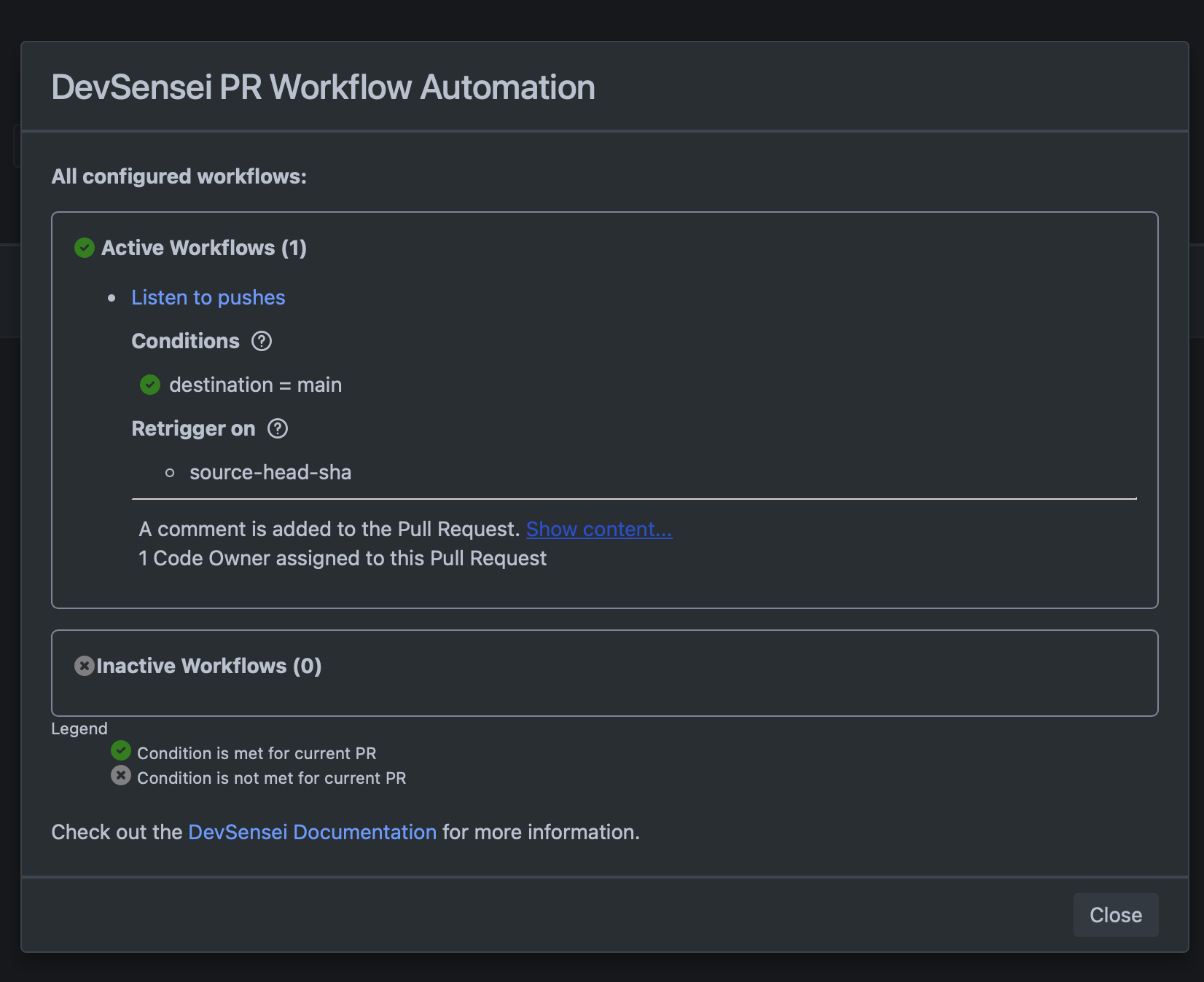
Visualization of the current state of a workflow that monitors pushes on PRs with the main branch as destination -
Why a new section?
A new section gives a clear distinction between two concerns: “what state should the PR be in to run an action” and “when should the action run”. Note that retriggers are an optional addition, and not required for the initial action run. i.e. actions will always run whenever the conditions become true.
-
Improvements
-
The Auto-Merge History Comment now also contains the time-zone information, in case users' time zones are different from the Bitbucket instance one
-
For Bitbucket version below 9.1, DevSensei will not try to auto-merge anymore when a Code Insight report is created but does not impact your pull request. This is both a performance improvement, as well as reducing the Auto-Merge History Comment size.
-
Schema for
devsensei.yamlfile for use in IDE now provides hints where to look in documentation for each section. -
Provide suggestions for attribute names in error messages when user configures incorrect/unknown names.
Bug Fixes
-
Fixed: UI elements failed with permission errors when the pull request was created from a private fork.
-
Unlicensed users in Bitbucket groups and reviewer groups are silently ignored instead of producing an error. These groups are maybe maintained by a different team and cannot be easily fixed in the configuration itself.
-
Better error message when there is a blank
devsensei.yamlfile - or when YAML aliases can not resolve to an anchor.
8.1.0:
New Features
-
Support for WebSudo
-
Bitbucket 9.0 introduced WebSudo to enchance security around all Admin matters in your Bitbucket instance. Admin settings for DevSensei | Code Owners will now follow the same security standards. You will need a WebSudo session to access the global admin settings page, and to change them.
-
-
Auto-Merge History Comment can be disabled
-
The Auto-Merge History Comment is added to pull requests that are flagged to be auto merged, either via the
[AUTO]prefix or via our Ship/Show/Ask framework. -
If you don’t want to have this Comment popping up, you can now disable it in the DevSensei | Code Owners global admin settings.
-
Improvements
-
The Auto-Merge History Comment now also contains the time-zone information, in case users' time zones are different from the Bitbucket instance one
-
For Bitbucket version below 9.1, DevSensei will not try to auto-merge anymore when a Code Insight report is created but does not impact your pull request. This is both a performance improvement, as well as reducing the Auto-Merge History Comment size.
8.0.2:
Bug Fixes
-
fixed issue: reviewers without access permissions where added to a pull request.
-
fixed issue: xself approval merge check checked for unrelated code owners.
8.0.1:
Bug Fixes
-
ConstraintViolationException in
AutoMergeService.commentMergeAttemptFailure
8.0.0:
⚠️ Announcements
-
Bitbucket 9 and Java 17 Support
-
Bitbucket 9.0 includes a major overhaul on how it integrates with the apps, also known as Atlassian Data Center Platform 7.
-
This required many adaptions to make the app continue to work on Bitbucket 9.
-
Improvements
-
Auto-merge now listens to Code Insights report created/updated events to allow auto-merging when the Code Insight based merge checks get approved, e.g. if there are no more annotations anymore
Bug Fixes
-
Syntax highlighting in the Code Owners Playground was not working anymore
-
Source file actions for Code Owners playground and documentation did not come up anymore on
CODEOWNERSfiles in the Bitbucket file browser
Version 7.x
7.1.0:
⚠️ Announcements
-
lorem
New Features
-
Troubleshooting Pull Request Auto-Merge
-
When using the Auto-Merge (or Ship/Show/Ask) feature, it was sometimes hard to understand why a pull request is not being merge. To address this issue, we introduce the Auto-Merge Pull Request comment.
-
Failed attempts of auto-merge will be reported in a dedicated comment, with an explanation of what is missing for or blocking the merge.
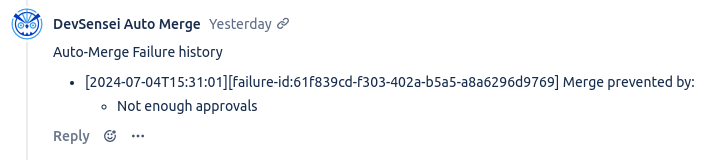
Example of Auto-Merge failure attempt explanation
-
Improvements
-
Invalid users (including unlicensed users) within your
CODEOWNERSordevensei.yamlfiles will not be blocking a Pull Request modifying the configuration file. Instead, you will be informed of such issues within a dedicated task added to your pull request.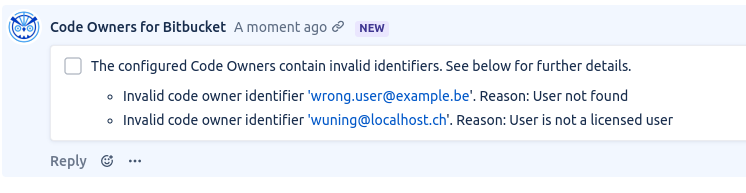
Bug Fixes
-
The Assignment Routing setting within your
CODEOWNERSfile will now be properly when moving to our DevSensei workflows. -
Code Owners are removed as reviewers when Pull Request is created as Draft
7.0.0:
New Features
-
DevSensei Pull Request Workflow Automation
-
🎉 We are excited to introduce DevSensei, a new pull request workflow automation solution, now integrated into the Code Owners App.
-
How does it work?
DevSensei configuration is YAML-based.Add a
devsensei.yamlfile to the root of your repository for the default branch, and DevSensei will automate your pull request workflow.The configuration file consists of a set of workflows. Each workflow is meant to automate specific tasks for the pull requests of your team. A workflow includes:
-
a name to identify the workflow
-
a set of conditions to be met for the actions of the workflow to be executed for a pull request
-
a set of actions to be executed when the conditions are met for a pull request
-
-
Can you show me an example?
Here's an exampledevsensei.yamlthat assigns Code Owners for a pull request introducing a new feature where the pull request is opened from a branch including the prefixfeature/with the destination branch beingmainor with arelease/prefix:YAMLworkflows: - name: Add Code Owners conditions: - source~=feature/* - or: - destination=main - destination~=release/* actions: - add-codeowners: rules: | *.js @@frontendDevs devsensei.yaml @@team -
When you create a pull request from a feature branch to
mainlike in the screenshot below, all members of the reviewer groupfrontendDevsare assigned because the workflow is active (all conditions aretrue) for this pull request. -
DevSensei will be visible in the following page locations:
-
Pull Request Create
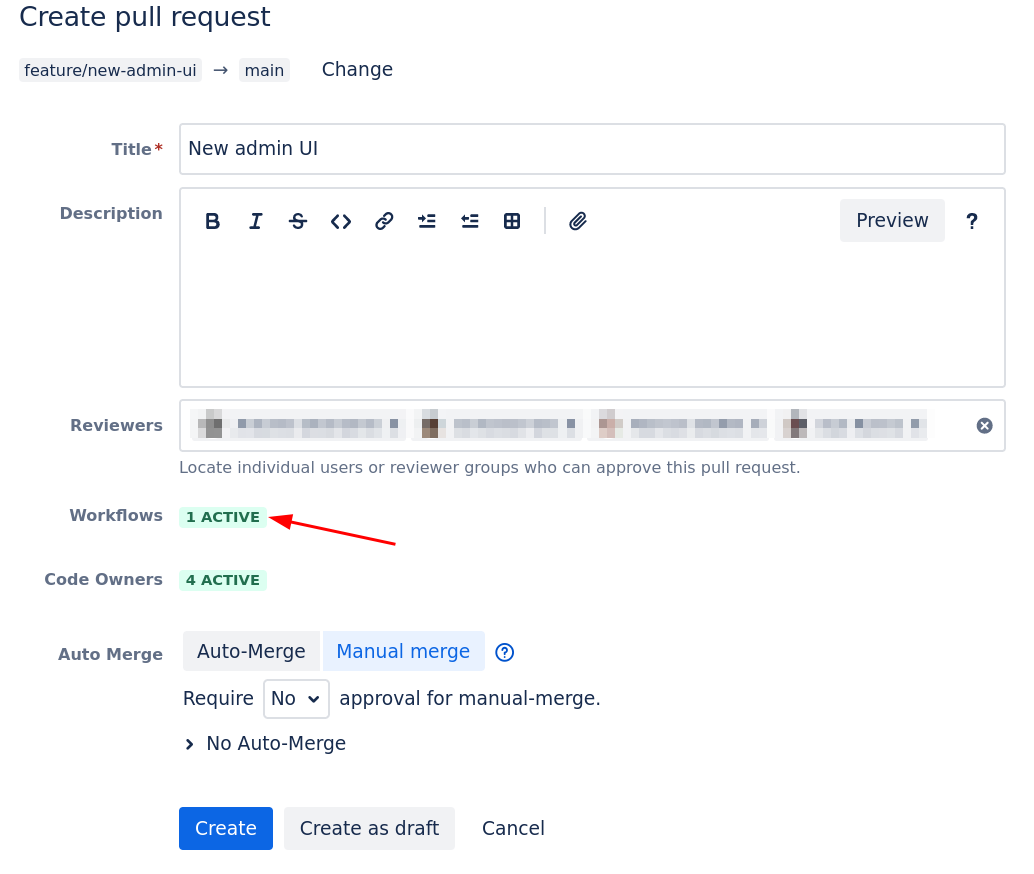
Pull Request Create Page: shows you which workflows will be applied when creating a PR. Click to see more details. -
Pull Request Detail
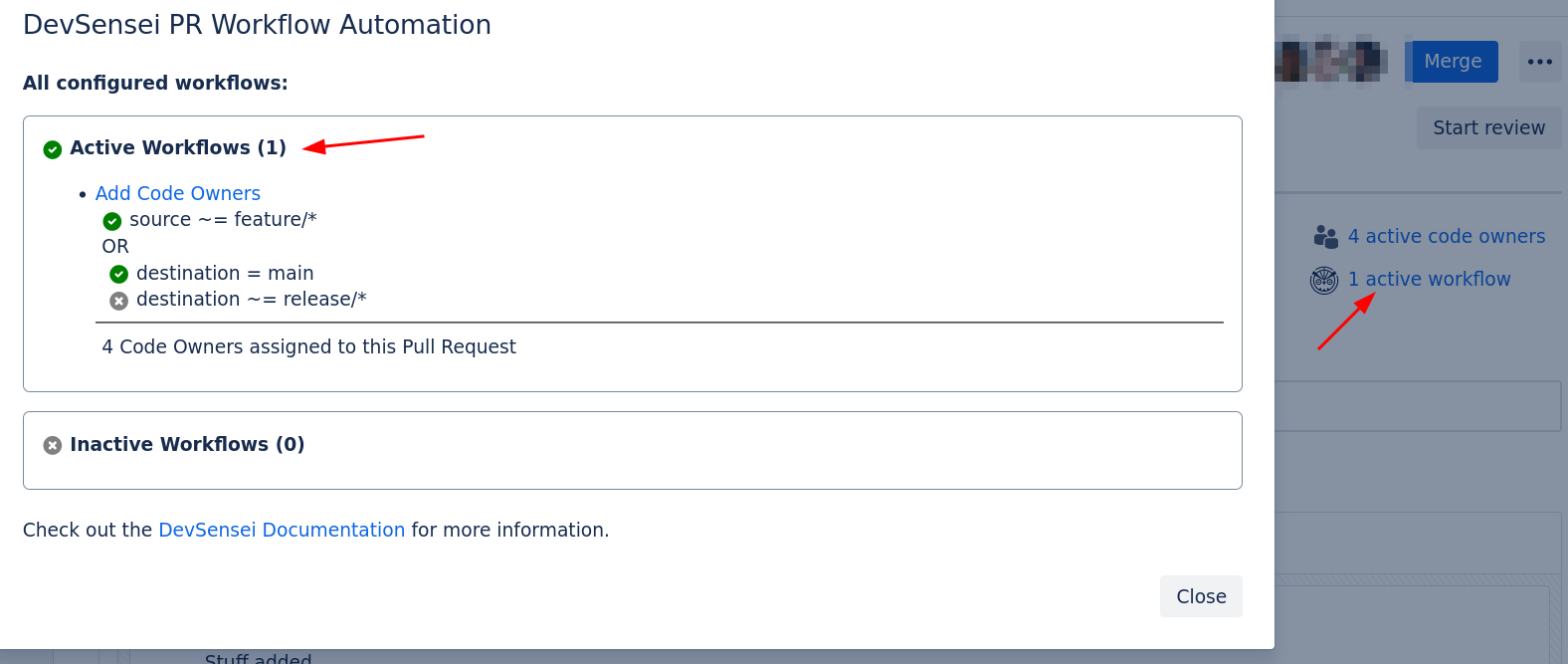
Pull Request Detail Page: See which workflows are active and why (conditions). -
Pull Request List
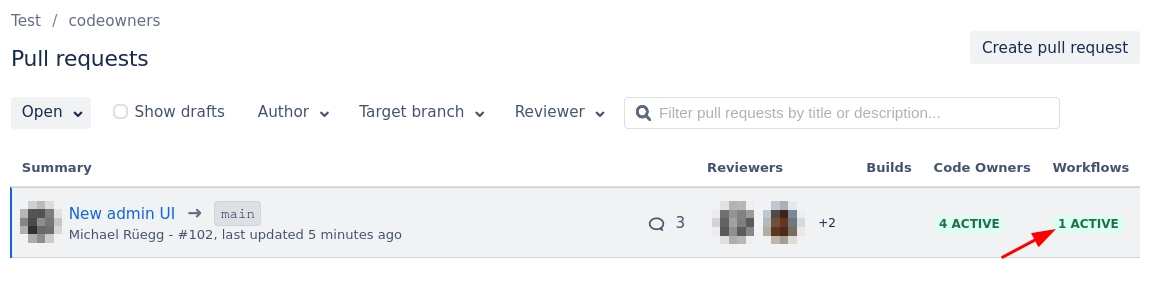
Pull Request List: Shows you how many workflows are active for your current PRs. Click to see more details.
-
-
-
What advantages has devsensei.yaml compared to CODEOWNERS?
-
The main advantage of
devsensei.yamlcompared toCODEOWNERSis sharing common rules across repositories with includeddevsensei.yamlfiles called Includes to reduce duplication and maintenance efforts. -
Another advantage is that common configuration parts (e.g. reusing the list of reviewers) can be shared with .
-
devsensei.yamlcurrently only supports a few actions. We will add many more actions in the future to automate your pull request workflow. Let us know what actions (e.g. adding PR comments or tasks) you are looking for. -
devsensei.yamlis always read from the default branch of your repository, instead ofCODEOWNERS, which is taken from the destination branch of the pull request. This will reduce the maintenance efforts significantly when you want to make changes.
-
-
How can I migrate from Code Owners to DevSensei?
-
To start using DevSensei from your existing
CODEOWNERSfile, you have two options:
1. a) Automated migration: migrate yourCODEOWNERSfile todevsensei.yamlwith the built-in migration support:Go to any repository using Code Owners→ ClickDevSensei Workflows→Download generated devsensei.yaml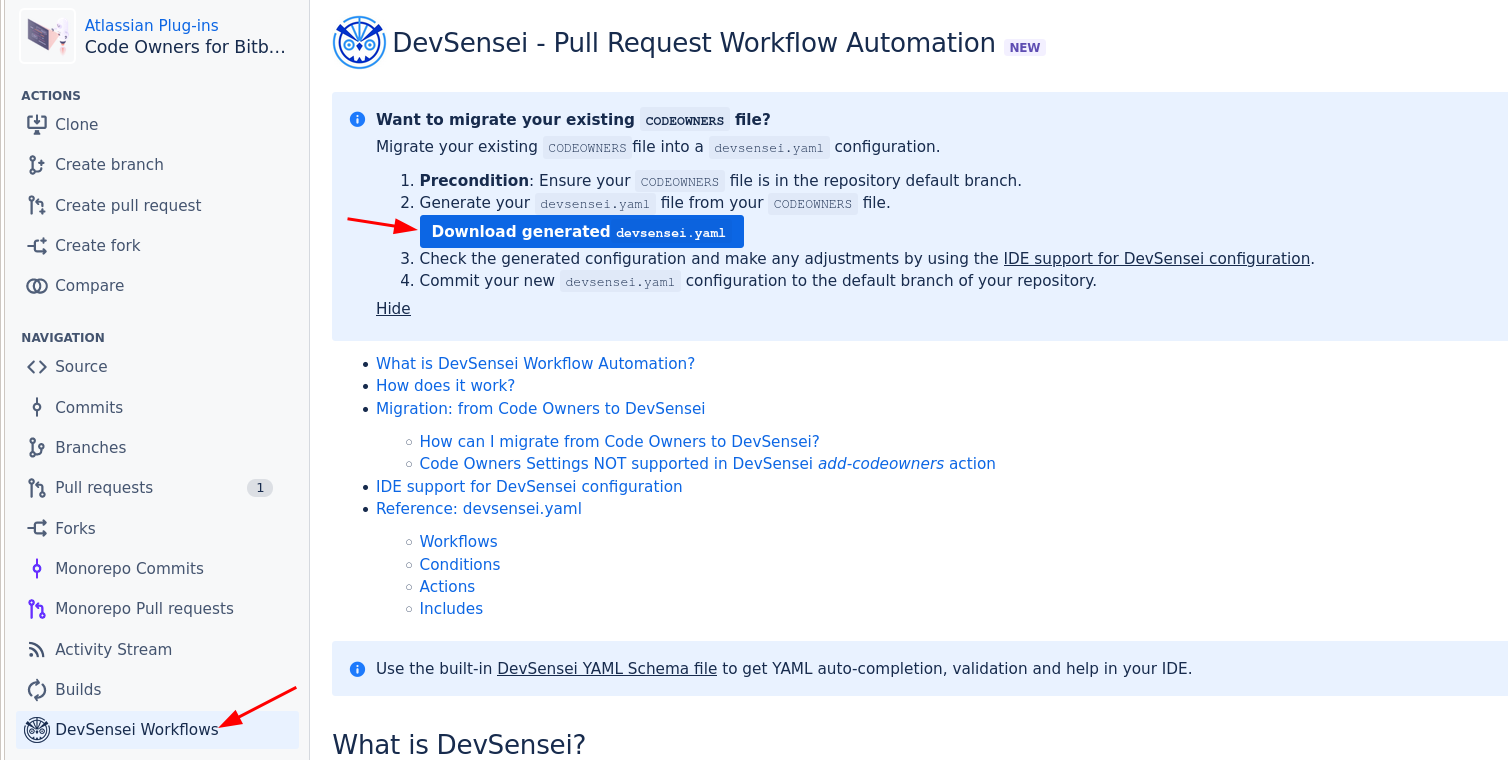
b) Manual migration: migrate your
CODEOWNERSsettings to their equivalents indevsensei.yaml. For the most part, copy everything exceptCODEOWNERSsettings and custom groups from theCODEOWNERSfile to therulessection ofdevsensei.yaml.
i. For the Code Owners settings, use the alternatives from the add-codeowners action.
ii. For the custom Code Owner groups (e.g.@@@my-group @peter @anna), use the custom-groups section ofadd-codeowners.
2. commit thedevsensei.yamlfile to the root directory in the default branch of your repository
3. enable DevSensei underrepository settings -> DevSensei | Code Owners -> DevSensei Workflows -> Enabled
-
When DevSensei is enabled, devsensei.yaml will take precedence over CODEOWNERS.
More information can be found in the .
Bug Fixes
-
Fixed regression for Glob matching that changed the behavior for single
*in Code Owner rule globs
Version 6.x
6.9.2:
Bug Fixes
-
fix: Wrong reviewer group being used instead of reviewer group with name fully matching
-
e.g. if you had a reviewer group called
team, and a reviewer group calledteam_blue, instead ofteammembers ofteam_bluehave been used.
-
-
💄: Long PR titles could be truncated because of Code Owners column in PR list.
6.9.1:
Bug Fixes
-
fixes: Glob /path/sub/ should not match /path/subfolder/other
6.9.0:
New Features
-
Support of Options in Glob Patterns
-
In globs, a selection of options to match is now possible. Examples:
**.{ts,js,css}  @web-developers   # Match ts, js and css files
src/{main,test}/**.* @devs        # Match files under the src/main and src/test directory
db/{schema/*.*,**/*.sql}          # Match files in /db/schema and all sql files.
-
Improvements
-
Reduces the Bundled JavaScript size, improving the performance of the app
Bug Fixes
-
Fix conflicts with other apps (like Crucible Hooks), where installing Code Owners would break the other app or Code Owners itself.
-
Fix the title of Auto-Merged pull request. Previously, a commit title generated by Bitbucket was used. Now, the intended Auto-Merge message is used.
Example: Auto-Merge: Pull request #12: [AUTO] Fix Spelling in Help Dialog
6.8.0:
New Features
-
Code Owners information available from the Pull Request summary
-
Code Owners assignment are now directly available from the Pull Request. You can see the number of reviewers at a glance from the Pull Request summary on the top right:

Number of Code Owners are available in the Pull Request summary
-
Moreover, you can get the full breakdown of who is Code Owner and for what reason by clicking on this button.
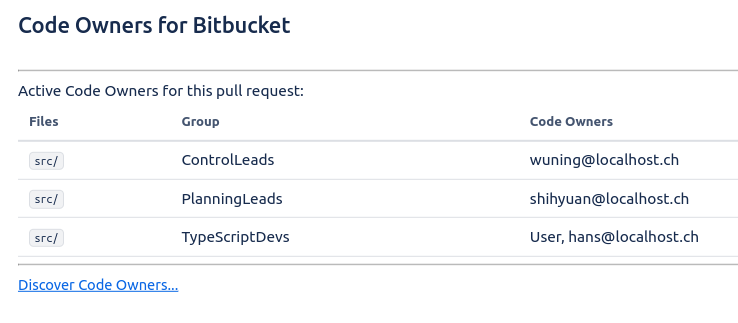
The full Code Owners assignment information are available by clicking on the Code Owners summary -
Previously, this information was contained only in the Pull Request comment (when enabled). Users who decided to opt out of the Pull Request detailed comment can now still have access to the full information.
As part of this change, we also removed the Code Owners Avatar decoration.
-
Improvements
-
Enhance display of errors from CODEOWNERS file in PR Creation
-
When creating a Pull Request, you could see errors from the relevant CODEOWNERS. This is still the case, but we improved how we display them to the user.
-
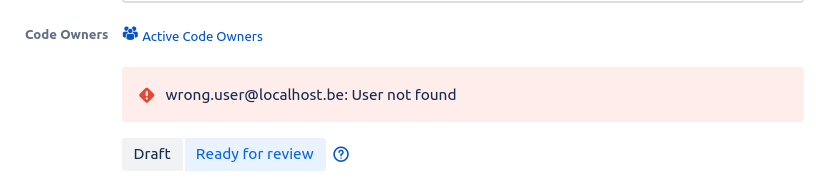
-
DevSensei will now attempt to auto-merge a PR on re-opening
-
Before 6.8.0, re-opening a pull request would not trigger DevSensei to auto-merge the Pull Request if conditions are fullfilled. In order to address a scenario where the conditions for the PR to be merged is fullfilled while it was temporarily close (for example, a succesfull build ended), DevSensei will now try to auto-merge a PR as soon as you re-open it.
-
Bug Fixes
-
Auto-Merge configuration modal used to have a title related to Ship/Show/Ask, even if only the Auto-Merge feature is enabled. The title will now adapt accordingly.
6.7.0:
New Features
-
Unblock pull requests, if CODEOWNERS files contain invalid user/group identifiers
-
If all merge checks are fulfilled, the app does not prevent merging anymore, if the CODEOWNERS file contains invalid user/group identifiers.
-
-
Dark Mode for Bitbucket 8.16
-
Auto-merge: Use PR author instead of Service User to merge
-
Other Bitbucket apps may provide their own merge checks requiring a Bitbucket users authentication. For example to access Jira. Previously the auto-merge was done with the apps Service User and failed if such authentication is required.
-
Now the app auto-merges as the pull request author. For audit reasons, the app writes a PR comment stating that the PR merge was triggered by DevSensei auto-merge.
-
Improvements
-
Improved performance
-
On large Bitbucket instances with many users, looking up repository read permissions for identifiers in the CODEOWNERS files caused the app to be slow.
-
We added caching for this permission look-ups. This improves performance for several code paths in the app, especially if there are many identifiers specified in the CODEOWNERS file.
-
Bug Fixes
-
Support special characters in file names, e.g.
src/{{template}}/README.md -
PR creation: Make sure Bitbucket failure message is visible and not replaced by CO failure message
6.6.0:
New Features
-
Random Assignment Routing: not-chosen Code Owners are no more PR Watchers
-
We have slightly changed the behaviour of using the (Random) Assignement Routing. Previously, Code Owners that were not selected by the Assignement Routing were added as Pull Request Watcher.
-
The goal was to still let people be aware that pull requests are being made. However, this was at the expanse of one of the goals of Assignment Routing, which is to reduce noise for your team. Following customers feedback, we decided to change this behaviour, and not-selected Code Owners will not be added anymore as Watcher.
-
Improvements
-
Improved performance for Pull Request Creation page
-
We have improved the loading performance of the Code Owners extensions within the Pull Request creation page. This will result in UI elements to be ready faster.
-
Bug Fixes
-
Issue: users added as individual code owners are required to approve Pull Requests in merge checks, even when they are the author.
Fix: users added as individual code owners are not required anymore to approve Pull Requests in merge checks when they are the author.
6.5.1:
Bug Fixes
-
The bug preventing the pull request list and branches pages on personal repositories to be rendered has been fixed.
-
The button allowing one to ready a draft pull request was sometimes not showing properly. This bug has been fixed.
Maintenance
-
Compatibility with Bitbucket 8.14 Code Owners feature: the Code Owners for Bitbucket app is still fully compatible with Bitbucket 8.14 onwards.
6.5.0:
New Features
-
Code Owners information are available from the Pull Request list
-
The Pull Request list now displays an additional column dedicated to Code Owners information
-
The global state of Code Owners is reflected at first glance (whether Code Owners is working properly, if the
CODEOWNERSfile is missing, or if it contains errors) -
The full details of which Code Owners are assigned to your pull request is available by clicking on the column
-

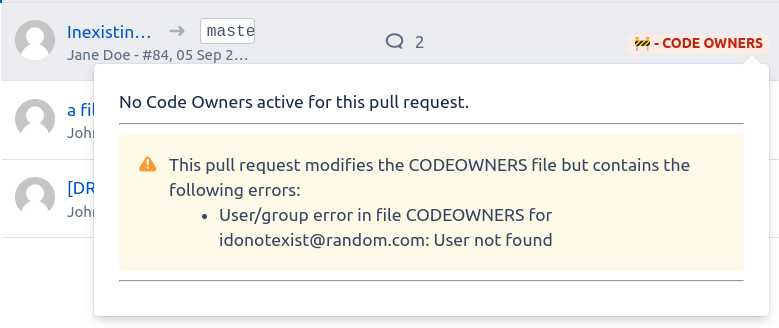
Improvements
-
Improved the Code Owners information design
-
We improved the Code Owners information available in the Pull Request creation form. The layout should now be clearer, and better account for involved
CODEOWNERSfiles.
-
-
Clearer description for DevSensei Auto-Merge feature in Pull Request creation form
-
The Pull Request creation form contains a description of how DevSensei will treat the pull request. The previous description was too dense and not clear enough. We improved on it for better understandability.
-
-
Added telemetry for improving application usage and performance
-
In a desire of continuously improving the application, Code Owners now gathers data about usage and performance. You can opt out of sending telemetry statistics by setting the Bitbucket property
plugin.ch.mibex.bitbucket.codeowners.telemetrytofalse.
-
Bug Fixes
-
Errors in
CODEOWNERSfile resulting in not finding users are now displayed properly in the Pull Request creation form.
Maintenance
-
Lot’s of (verbose) errors related to the management of Build events were logged, while being uninformative and harmless. Most of these errors will now stay silent unless you enable debug logging.
6.4.1:
Improvements
-
Further optimizations for performance improvement of Code Owners
6.4.0:
New Features
-
Global option to disable Code Owners
-
You are now able to globally configure Code Owners under the Administration level.
-
This will allow you to configure repositories to have Code Owners enabled/disabled by default with one click. Individual and/or projects can still choose to further enable it.
-
When disabling Code Owners, it will no longer auto-assign reviewers to your pull request, and all related UI elements will not be shown.
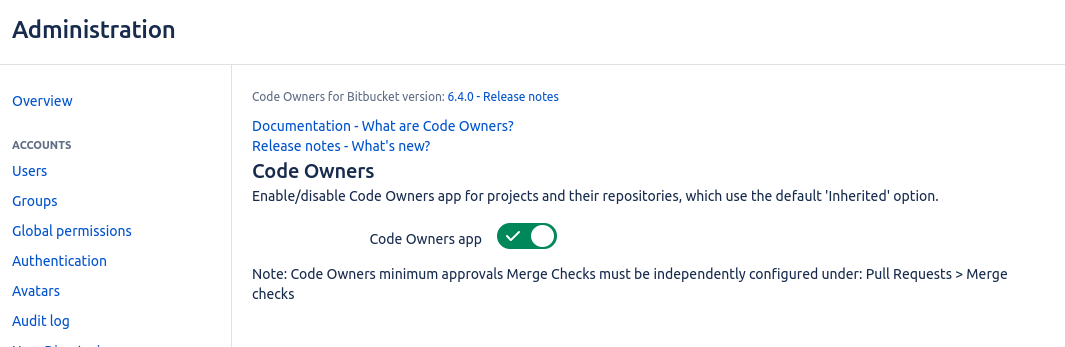
-
-
Integrated UI to change the DevSensei auto-merge Pull Request type
-
It is now possible to change the type (manual, auto, ship, show or ask) of an opened Pull Request. It is available under the context menu button on the Pull Request page.
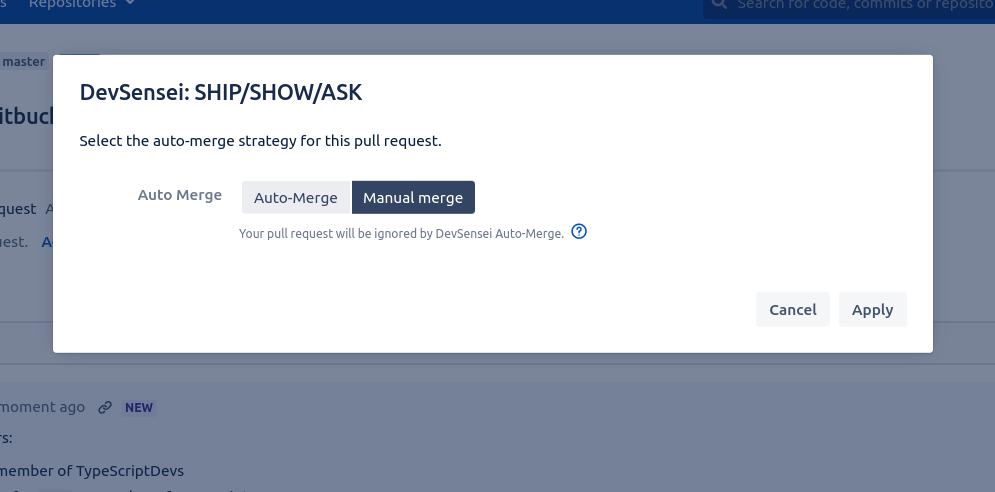
-
Improvements
-
Improved overall performance of Code Owners
-
We started an effort to make the Code Owners app more performant, especially for large Bitbucket instances.
-
-
DevSensei will not auto-merge a Pull Request marked as “work needed”
-
Before 6.4.0, a pull request would be automatically merged, even if one of the reviewers set their review status to “needs work”. This is no longer the case.
-
-
Security improvements
6.3.0:
⚠️ Announcements
New Features
Improvements
-
More flexible UI for marking a Pull Request as “Ready for Review” (aka. un-draft)
-
In release v6.2, support for Draft pull requests was introduced.
-
Now, you can also use the in the process of marking a Draft pull request as “Ready for Review”, similar as if you would create a new pull request.
-
Give it a try by:
-
1. → pull request title starts with:
[DRAFT] -
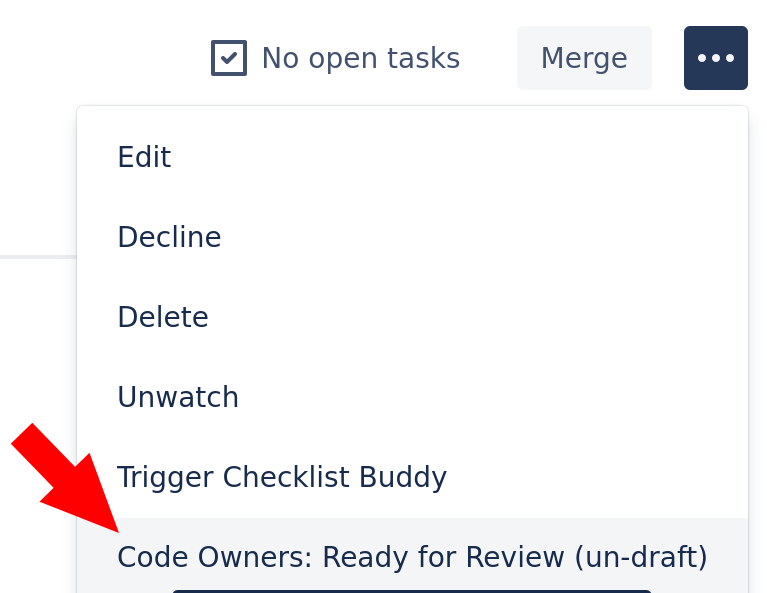
2. Open this pull request and click in the menu the button:
Code Owners: Ready for Review (un-draft) -
3. Check out the new UI to mark the pull request to Auto-Merge when ready to merge.
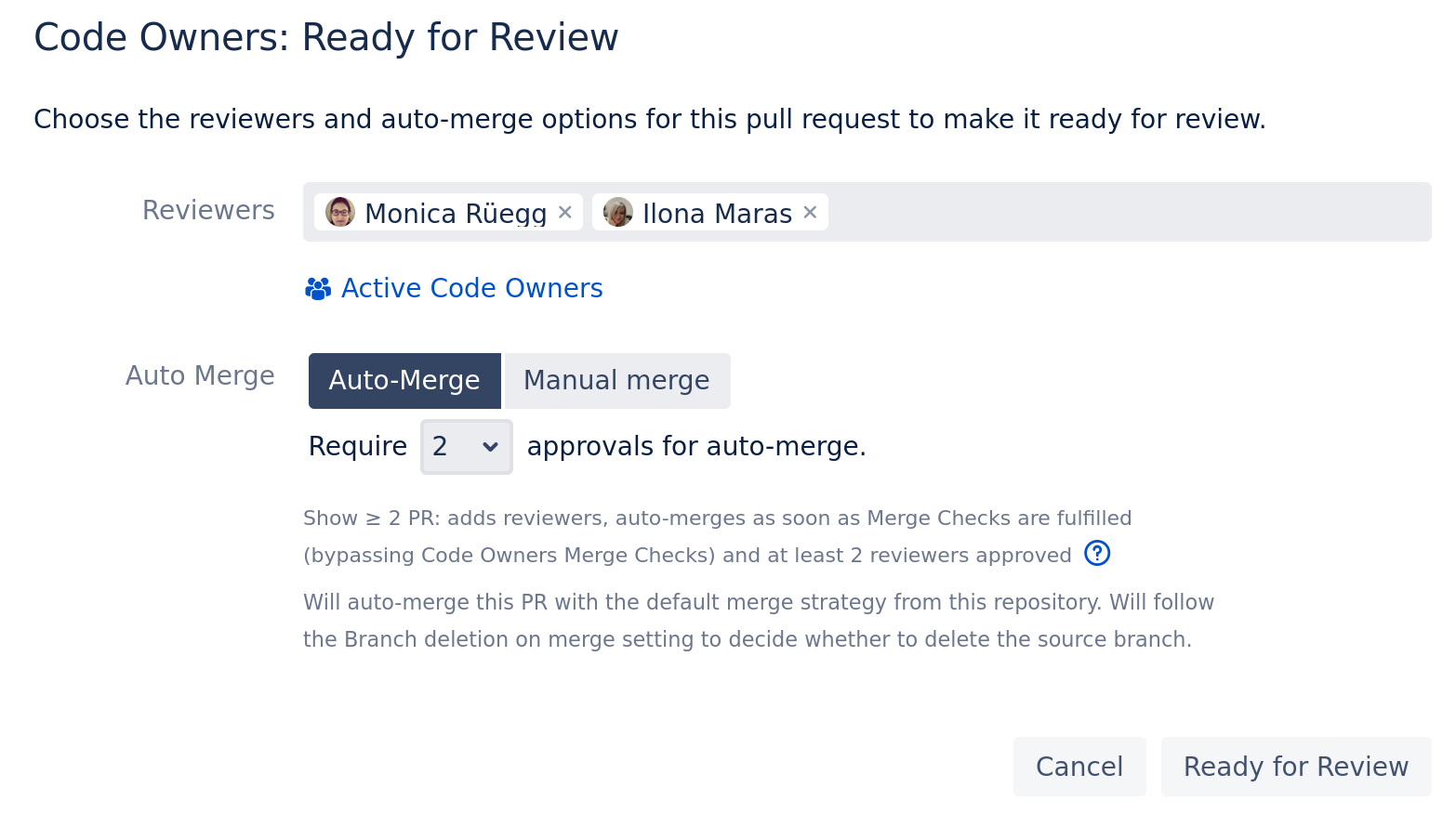
-
-
Bug Fixes
-
Hide Random Code Owners Assignment hint when auto-assignment is disabled.
6.2.0:
⚠️ Announcements
New Features
-
Random Code Owners Assignment
-
Code Owners can now be configured to automatically assign only a subset of each of your code owners group for review. This allows you to reduce the number of reviewers for a pull request and the amount of notifications your team will receive.
-
Currently, the only supported method is to choose code owners at random.
-
You can add the following line to your
CODEOWNERSfile, -
CODEOWNERS.toplevel.assignment_routing random 2 -
and the app will pick 2 code owners for each group that are relevant to your pull request.
-
You can find more information in the Settings Documentation page.
-
-
Create a Pull Request as a Draft
-
In the previous release 6.1, we introduced the initial support to mark a pull request as a draft with the pull request title prefix
[DRAFT]. In this release, we added the ability to do this with the ease of a button click while creating the pull request.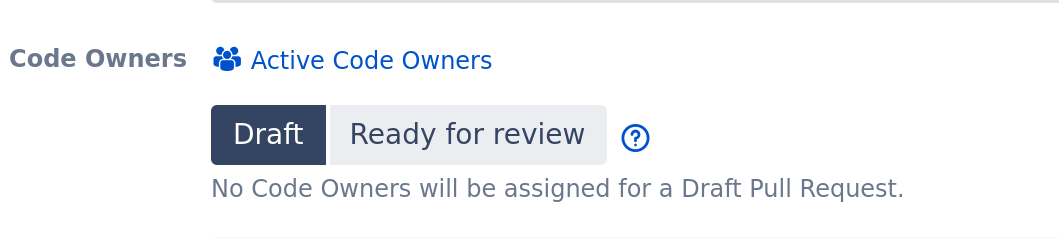
-
This will allow you to consider a Pull Request as a draft and as work in progress to get early feedback. No Code Owners will be automatically assigned to your pull request until you mark your Pull Request as being Ready for Review. You can manually add reviewers (the usual way) if you want to cherry pick them.
-
-
Globally configure DevSensei Auto-Merge
-
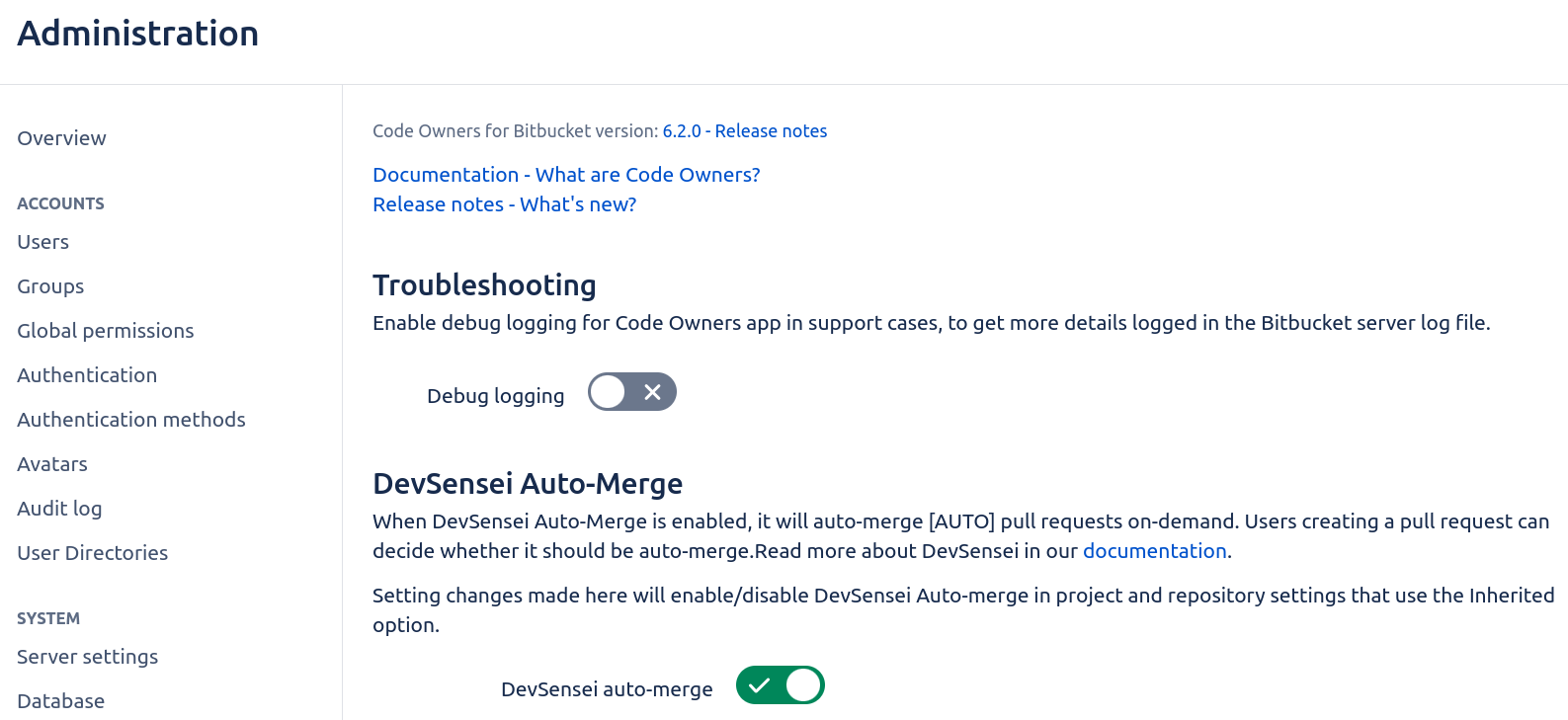
You are now able to globally configure DevSensei Auto-Merge under the Administration level.
-
This will allow you to configure repositories to have DevSensei Auto-Merge enabled/disabled by default with one click.
-
Improvements
-
When available, DevSensei Auto-Merge will now decide whether to delete the merged branch based on the “Branch deletion on merge” setting.
|
Bitbucket version |
Source Branch deletion settings |
|---|---|
|
7.15 and higher |
|
|
below 7.15 |
|
Bug Fixes
-
Prevent the ability to auto-merge if it was disabled in destination repository.
-
Prevent to auto-merge, if pull request author misses permission to merge.
6.1.0:
New Features
-
Draft Pull Request support
-
Include [DRAFT] in your pull request title to indicate it's still work-in-progress or you want early feedback from a colleague.
-
Code Owners won't auto-assign reviewers until [DRAFT] is removed.
-
After removing the prefix, Code Owners will assign the responsible code owners as reviewers.
-
This process ensures requests for reviews are only sent when your pull request is ready to review.
-
Improvements
-
Auto-merge:
-
Support legacy Build Status API to trigger auto-merges (used by some Jenkins notification plugins)
-
Use configured default merge strategy for auto-merges
-
Prevent auto-merges when the pull request has a failed build or a build is still running
-
Auto-merge pull requests if there are failed builds from old commits and only consider builds for latest commit instead
-
-
Auto-unapprove:
-
prevent unnecessary unapprovals after squashing commits
-
also unapprove non-code-owners on pull request changes
-
Bug Fixes
-
Fix Bitbucket 8.10 support in auto-merge
6.0.1:
Bug Fixes
-
Fix Code Owners behavior when the destination branch of a PR is changed and the setting
CODEOWNERS.destination_branch_pattern was active. -
Fix to a non-forwarding email address for DevSensei service user
6.0.0:
New Features
-
Release of DevSensei Auto-Merge
-
We are pleased to announce the integration of DevSensei Auto-Merge into Code Owners.
-
You can't afford to wait any longer! With pull requests taking too long to be merged, you might face delayed customer feedback and longer-living branches causing merge conflicts. But there's a new branching strategy for combining advantages of both pull requests and shipping features faster: Ship/Show/Ask. Our DevSensei Auto-Merge application implements this strategy, allowing you to quickly ship features to your customers while still gathering feedback and making necessary changes. This results in a faster development cycle, more efficient use of resources, and ultimately, a better product for your customers.
-
When installing Code Owners 6.0, DevSensei will be enabled by default.
-
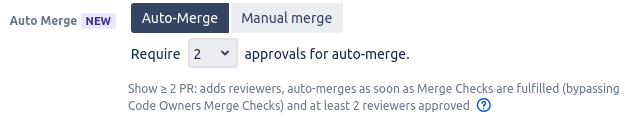
With DevSensei enabled, your team members can select “Auto-Merge” when creating a pull request. Such pull request will be merged as soon as all merge checks are fulfilled (merge checks include requiring review approvals, successful pipeline run…)

-
Your team can also opt-in to embrace the full Ship/Show/Ask pull request workflow. DevSensei provides the tools to bring Ship/Show/Ask PR strategy to its full potential. It offers a dedicated UI guiding your team members to making the right choice.
-
-
See Ship/Show/Ask for more detail and check out our Auto-Merge guide.
-
Bug Fixes
-
The Code Owners playground is now properly rendered in the “No CODEOWNERS file” popup window.
Version 5.x
5.5.0:
New Features
-
Automatic unapproval of reviewers only includes affected CodeOwners
-
New setting to automatically unapprove codeowners when a pull request changes.
Similar to Atlassian's Auto Unapprover app, but unapproves only codeowners that own the new changes in the pull request.
The feature can be enabled in the toplevel CODEOWNERS file by adding the following line:
CODEOWNERS.toplevel.auto_unapprove_on_change enable
-
-
Integrated Code Owners Playground
-
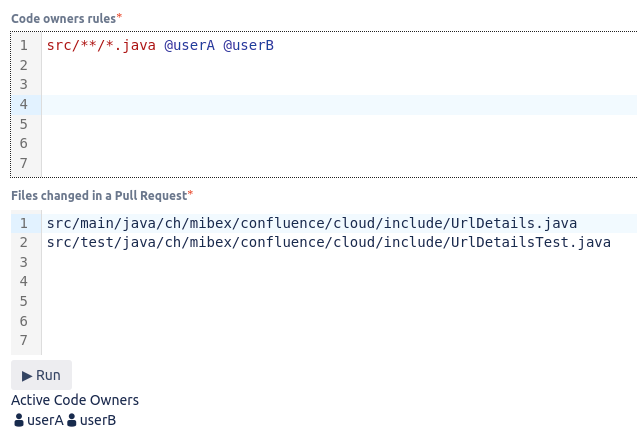
The interactive Code Owners Playground is now also integrated directly within the admin page of the plugin. You will find the “Playground” tab within the other documentations tabs:
-
-
Support for changing CODEOWNERS file on PR destination change
-
When you change the destination of a pull request, it may happen that the content of the CODEOWNERS file in the original destination is not the same as the one from the new destination. Previously to 5.5.0, such a situation would not trigger the CodeOwners again, and you had to manually do it via the interface. This triggering is now done automatically.
-
Bug Fixes
5.4.1:
Bug Fixes
-
Fix permission issue in merge check for CODEOWNERS file changes verification with Reviewers Groups
5.4.0:
⚠️ Announcements
New Features
-
Support for Bitbucket Reviewer Groups
-
Besides Bitbucket user groups and custom Code Owners groups, you can now also use Bitbucket’s pull request reviewer groups in Code Owner rules. This makes the maintenance of groups easier when you have a lot of changes, as you don’t need to change it in
CODEOWNERSanymore. Example:ebanking/**/*.js @@JSExperts Check(@@JSExperts >= 2)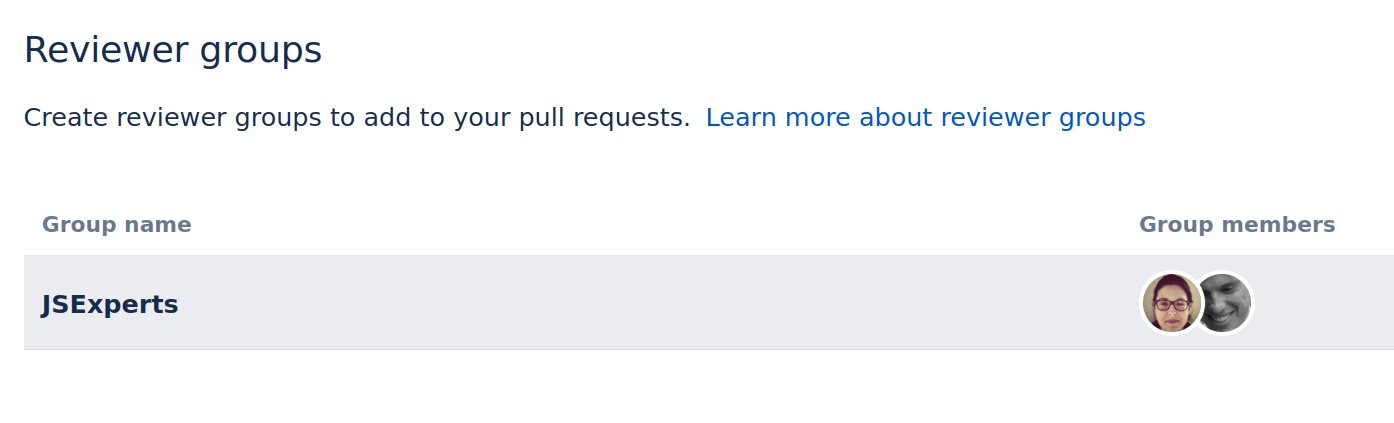
-
-
Better Support for CODEOWNERS files
-
When you view CODEOWNERS files in Bitbucket, there is now a button which takes you to the Code Owners playground.
-
Errors in the CODEOWNERS syntax are now shown in Bitbucket.
-
5.3.0:
⚠️ Announcements
New Features
-
Fallback group for absent Code Owners, members of this group approvals count as CO to every merge check rule (opt-in)
-
Use-case: in case of absences of CodeOwners, PRs can not be merged and may block the team progress.
-
Define a group called FallbackOwners, and if members of that group are added to Pull Request and approve it, it counts towards the limit in Code Owners merge checks:
-
@@@FallbackOwners   @LisaTheFrontendExpert @PeterTheUISpecialist
ebanking/**/*.js    @@EbankingJSTeam
Check(@@EbankingJSTeam >= 2)
-
PR author considered as approving owner in group merge checks (opt-in)
-
If you want that PR authors, who are Code Owners themself for the changes, count towards group merge checks, you can now configure that.
-
Add the option: AuthorSelfApproval to the corresponding Group check. e.g.
Check(@@Devs>=2,AuthorSelfApproval) -
which reduces limit by one, if PR author is also Code Owner as member of Devs group.
-
5.2.1:
Bug Fixes
-
Fix global Code Owners admin page
5.2.0:
Improvements
-
Improved messages for syntax errors in CODEOWNERS file
-
We tried to make them more helpful to fix the cause of the error by providing more context.
Let us know if you still encounter any misleading or cryptic error messages. Thanks.
-
-
App toggle for Code Owners app also on Project level
-
Added toggle in Project settings to disable Code Owners app for all repositories in project.
-
complementary to toggle on Repository level introduced in last release
-
-
Bug Fixes
-
Prevent permission problems in combination with other apps (e.g. Office 365) by using service user for user look-up in merge checks
5.1.2:
Maintenance
-
Performance optimization for repos with deep folder structure, previously git ls-tree could result in high CPU load on Bitbucket.
5.1.1:
Bug Fixes
-
Non-admins receiving 403 error pop-up when viewing PR
5.1.0:
⚠️ Announcements
This version was removed from marketplace due to regression found. If you have installed 5.1.0 please upgrade to 5.1.1 asap.
New Features
-
Exclusion for some Source branches of pull requests
-
Option to exclude Code Owners for pull requests with source branches matching a pattern.
-
Use-cases:
-
Enforce reviews to master branches, except if they are release merges, e.g release/x.y.z -> master
-
Automated dependency updates by bots
# To exclude code owners functionality for pull requests with certain source branches,
# you can add the CODEOWNERS.source_branch_exclusion_pattern followed by a
# branch pattern to your CODEOWNERS file.
# The whole CO file is then not active for pull requests with matching source branch.
# For example if you want code owners to be inactive for pull requests create by renovate bot with source branch starting with renovate, add

CODEOWNERS.source_branch_exclusion_pattern renovate/*
-
-
-
-
Disable Code Owners app in repo settings
-
Added toggle in Repository settings to disable Code Owners app, so that app is completely disabled for PRs in such repos, e.g. no notifications send.
-
Bug Fixes
-
Allow braces {} in file globs.
5.0.0:
⚠️ Announcements
-
Support for Bitbucket 6 dropped with this release.
-
We recommend to upgrade to current version of Bitbucket.
-
-
Merge checks revisited (breaking changes)
-
Changes:
-
Add support for ANDing merge checks on same line
-
Allow combining
OverallCheckandAllGroupsCheckwith other merge checks -
Changed when OR checks are active (BREAKING)
-
For combined Merge checks with OR/AND, the inactive Group checks are stripped and the remaining checks must be fulfilled, that the pull request can be merged.
-
Example:
-
@@@JavaDevs @matt @ann @peter
@@@TeamLeads @doris

*.java   @@JavaDevs
*.adoc   @@TeamLeads

(Check(@@JavaDevs >= 2) | Check(@@TeamLeads >= 1))
-
-
-
Old, up until 4.x: when a PR contains one file
foo.java, the complete OR merge check was disabled. Thus, no merge checks were enforced. -
New, starting with 5.x: when the PR contains one file
foo.java, the matching merge checkCheck(@@JavaDevs >= 2)is active, while the inactive merge checkCheck(@@TeamLeads >= 1)got stripped. Thus, it is required that two Java Devs approve the PR.-
For all the details, go to Merge Checks
-
-
Improvements
-
Repo settings page UX improvements
Version 4.x
4.2.0:
⚠️ Announcements
-
Bitbucket 8 compatibility
-
Code Owners app is now compatible with newly released Bitbucket 8!
-
Bug Fixes
-
Allow colon `:` characters in file globs
4.1.1:
Bug Fixes
-
Trigger Code Owners button not visible in Bitbucket versions 7.0 - 7.10
4.1.0:
⚠️ Announcements
New Features
-
Trigger Code Owners manually in Pull Request menu
-
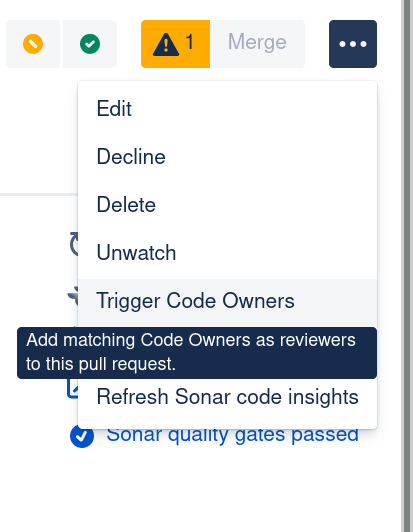
You can now manually trigger Code Owners to be added to the Pull Request in the Pull Request Menu.
-
Useful in scenarios like:
-
Add all Code Owners as reviewers for WIP pull request, if they are ready for final review
-
Apply changes in CODEOWNERS file of destination branch to open pull requests
-
Introduce Code Owners to new repository and apply it to already open pull requests
-
….
-
-
Bug Fixes
-
Group association incorrect for members of Code Owners groups, which are defined referencing Bitbucket user groups
4.0.2:
Bug Fixes
-
Fix performance problem in Code Owners calculations for PRs with a lot of changed files
-
Code Owners calculation took too long and therefore reviewers were not auto-filled and Merge button was blocked.
-
4.0.1:
Bug Fixes
-
Fix permission problem for Repo admins: CODEOWNERS-24: Code Owners tab in repo settings fails to read from API endpoints
4.0.0:
⚠️ Announcements
-
Removed support for Bitbucket Server 5.x
-
Since Bitbucket Server 5.x reached end of life, we removed support for it in Code Owners 4.0 .
-
New Features
-
New, flexible Merge Checks:
-
based on active Code Owners groups
-
defined in CODEOWNERS file, beside the regular owner rules
-
possibility to combine several checks with either OR relation
-
The two existing options to define merge checks was for many of our customers too restrictive and did not match their workflows.
-
Therefor we added a more flexible option to define merge checks.
-
Check out our new Merge Checks guide to learn how to use them.
-
-
Option to disable Code Owners features per repository
-
Auto-assignment as reviewers to PRs (on per default)
-
Merge checks (off per default)
-
Merge Checks was already an opt-in feature per repo base.
-
We added an option to opt-out from auto-assignment of Code Owners as reviewers to newly created or updated pull requests. Find it in the repository settings under Code Owners.
-
If you want to disable Code Owners e.g in a forked repository, you just need to turn the
-
auto-assignment off in the repository settings of the fork.
-
Or if you have a big group of potential reviewers and you want to enforce that some must review, but your team should decide for each pull request, who that should be? Enable and configure your Merge Checks and disable the auto-assignment. The Code Owners tooltip in pull request creation wizard will still help you to choose the right person as reviewers.

-
Improvements
-
Debug Logging switch in global app settings
-
Admins can turn on Debug logging for Code Owners by simple toggle a switch in the global settings of the Code Owners app. And off again of course, after you have sent us the logs for support cases.
-
Version 3.x
3.1.5:
Bug Fixes
-
Fix quoted usernames containing @ symbol, e.g. from LDAP
3.1.4:
Maintenance
-
Improve performance 🚀 for big CODEOWNERS files with many rules
3.1.3:
Bug Fixes
-
Fix support for fully qualified patterns in branch filtering, like
refs/heads/develop-
If you have branches with same suffix like
something/developanddevelop, but Code Owners should only apply to pull request with destination:develop, but not for destination:something/develop, then you can use fully qualified pattern:refs/heads/develop. -
Background: https://confluence.atlassian.com/bitbucketserver070/branch-permission-patterns-996644139.html
-
Patterns only need to match a suffix of the fully qualified branch or tag name. Fully qualified branch names look like
refs/heads/master, while fully qualified tags look likerefs/tags/1.1.
3.1.2:
Bug Fixes
-
Allow merge if PR author is single Code Owner in rule
-
PR could not be merged before, if creator has a matching personal rule and merge check active with numeric value for ‘Min. # of approvals’.
-
3.1.1:
Bug Fixes
-
Only add new Code Owners to pull requests on rescope events when the source branch, but not the destination branch changes.
-
Before, this led to a bug in combination with the destination branch filter feature, where manually removed reviewers got wrongly re-added.
-
It caused confusion, as rescope events triggered by changes on destination branch are not visible in pull request activities.
-
Code owners can still be added manually to pull requests as reviewers at any time and are marked as Code owners.
-
Maintenance
-
Performance improvement in rescope event handling
3.1.0:
⚠️ Announcements
-
End of support for Bitbucket Server 5.x
-
Since Bitbucket Server 5.x reached end of life, we will remove support for it in Code Owners in one of the next releases.
-
3.0.3:
Improvements
-
Improved formatting of CodeOwners active rules explanation in pull request comments and tool-tips.
-
Improved positioning of CodeOwners avatar decorations (Bitbucket 7.9.x and newer)
Bug Fixes
-
Fix combined use of CodeOwners with Default reviewers from Bitbucket
-
Earlier 3.x versions are not compatible with Default reviewers feature
-
-
Fix Merge checks for rules with individual users, if group merge check is active.
-
If CodeOwners merge checks are active, any user which is mentioned individually in a active code owner rule, must approve, before pull request can be merged.
-
There was a bug in the group based Merge check validation. If an individual user was also member of a active group rule, the check did not enforce the approval of this individual, if other group members have approved.
-
3.0.2:
Bug Fixes
-
Fix installation problem of 3.0.0 artifact.
-
Automatic Marketplace upload broke the release artifact.
-
3.0.0:
⚠️ Announcements
Installation problem reported!
Please install version 3.0.2 instead.
Thank you for your understanding.
New Features
-
Let author and participants remove Code Owners as reviewers from a pull request
-
The rule that all Code Owners are mandatory reviewers that cannot be removed from pull requests was for many of our customers too restrictive and did not match their workflows.
-
One example is that the pull request creator should be able to remove a Code Owner as a reviewer, e.g. if this person is on holiday, and there are enough other owners to approve to get a pull request merged. Or if a colleague should review a draft version of the pull request changes, not all Code Owners should be notified about the draft version, but only when the pull request is ready for general review.
-
The assignment of Code Owners as reviewers should really be a convenience helping to select the right people to review a PR, and not for enforcing reviews. Enforcing reviews and approvals are done by the Code Owners specific merge check (as before).
-
So we removed this rule, and now you can:
-
Remove Code Owners as reviewers on pull request creation or later in the pull request edit modal
-
Re-add removed reviewers later and the app will recognize them as Code Owners again, but the app will skip manually removed Code Owners on pull request updates
-
Enforce approvals by Code Owners before merging by the Code Owners merge check. Therefore, make sure that the merge checks are properly configured
-
-
-
Possibility to skip Merge checks for repository Administrators (opt-in)
-
Requested by our users, we added an option in the Merge check settings, to allow repository admins to merge pull requests, even if the Merge checks are not fulfilled.
This should be used sparsely but can be valuable if e.g. a Code Owner is not available, but the pull request should be merged to not block further progress.
-
Bug Fixes
-
Code owners minimum approvals pattern: *
-
Approval required from all code owners, using the asterisk in merge check config, does now correctly handle the case when the pull request author is at the same time also code owner for changes in the pull request.
-
-
Destination branch filtering only applies to owner rules, but not top-level configuration anymore.
-
Before, this led to a bug in combination with the subdirectory override feature.
-
-
Code owners are now correctly considered as code owners after re-added as reviewers to a pull request if they removed themselves before.
-
Avatar decoration of Code Owners had some issues in previous versions, which got fixed in this version.
Version 2.x
2.5.1:
Bug Fixes
-
Merge check fails with "not permitted to access" if pull request is issued from a fork
-
Pull Request cannot be created when the code owner file contains a email of an user without repository permission.
2.5.0:
Improvements
-
Removal of pre-receive hook and instead doing CODEOWNERS file validation in merge check:
-
We decided that pushing commits should always be possible (for example to backup partially complete work, to hand over stuff etc.), even if there are errors in the CODEOWNERS file(s) like syntax errors or permission problems for defined code owners.
-
We therefore moved the CODEOWNERS file validation check to the merge check side, where the source branch is checked to have valid CODEOWNERS file(s).
-
Bug Fixes
-
Rendering issue for Pull request edit form in Bitbucket >= 7.5 fixed.
2.4.0:
New Features
-
Subdirectory overrides: You can now enable subdirectory overrides, allowing subdirectories to have their own Code Owners files. This is great if there are multiple projects in a shared repository and each project needs to manage their own Code Owner rules.
-
In the top-level CODEOWNERS file add:
CODEOWNERS.toplevel.subdirectory_overrides enable
Now a subdirectory can have its own rules, for example inproject-a/CODEOWNERS:#Project A rules * @@ProjectATeam
-
-
Destination branch activation: Per default, a Code Owner file affects pull requests for all destination branch names. You can make a Code Owner file to only apply pull requests with specific destination branches. For that you need to configure the
destination_branch_patternoption in your Code Owner file, where you can configure a pattern for matching destination branches in pull requests.-
Used pattern format is similar to the Atlassian branch permission patterns.
For example, if you want to activate code owners only for pull requests for the destination branch
master:CODEOWNERS.destination_branch_pattern masterIf you also want to have pull requests with release branches covered by Code Owners, also add this next line:
CODEOWNERS.destination_branch_pattern release/*
-
-
Disable Code Owner comments: By default, Code Owners adds a comment with the code owners of the pull request and the reason for inclusion. If you don’t need this comment and want fewer notifications, you can now disable it:
CODEOWNERS.toplevel.create_pull_request_comment disable
2.3.0:
New Features
-
File negation patterns: You can now use
!for negation in front of a file pattern without any code owners afterward to unset all previously defined code owners of the files. As an example, the group@devopswants to review everything underci, exceptci/playgrounds.yml, which nobody needs to review:
ci/*                     @devops
!ci/playgrounds.yml
Bug Fixes
-
If a pull request has more than 4 reviewers, additional reviewers are shown under a “+” icon.
Avatars of code owners in this pop-up are now also annotated. -
Code owners could be removed in the pull request edit dialog in Bitbucket >= 7.0 which is now fixed.
-
Improved documentation that CODEOWNERS file needs its own rule so that it cannot get moved or deleted without a review by a code owner.
-
Prevent the CODEOWNERS file to be renamed without code owner approval.
-
When switching branches on the create pull request page, code owners were not always cleared when a branch was chosen which had no code owners.