

What is DevSensei?
|
Note |
|
DevSensei is a pull request workflow automation solution integrated into the Code Owners App.
It is for teams who want to:
-
reduce the overhead of working with pull requests.
-
e.g. auto merge minor changes after the automated checks passed
-
-
automate workflows in pull requests.
-
e.g. assign the right reviewers
-
-
follow and enforce team policies.
-
e.g. add tasks to the pull request based on what changes are made, and block merging until the tasks are completed.
-
Getting Started 🔰
-
Enable DevSensei for your repository:
-
Navigate to the repository → Repository Setting (⚙️ on the left) → DevSensei | Code Owners Settings. Alternatively, the setting is also available at the project level.
-
In the settings panel, enable the
DevSensei Workflows
-
-
Add the sample
devsensei.yamlfile below to the default branch of your repository.
Workflow to add comment on pull requests ready to review (basic example)
workflows: - name: Add Comment conditions: - not(draft) actions: - add-comment: content: | This pull request is ready to review. Thanks.
-
Done! When you create a pull request, then the comment will be added. On draft pull requests the comment is added as soon as the pull request is marked as ready to review.
Some more examples
workflows: - name: Bugfix Release Policy Reminder conditions: - destination ~= 'release/*' # When the pull request targets a release branch - source ~!= 'bugfix/*' # And isn't from a bugfix branch actions: # Add the reminder comment - add-comment: content: | Reminder: Only bugfixes should be merged into a release branch. If it is not an urgent bugfix, please change the pull request destination to the development branch. - name: Release Tasks conditions: - source=main - destination=latest-release actions: - add-comment: content: Is the public documentation up to date? task: true - add-comment: content: The release announcement is prepared? task: true - name: Add reviewers custom-attributes: codeowners: rules: | **/*.java java-expert@our-company.com **/*.js javascript-expert@our-company.com conditions: - destination ~!= 'sandbox/*' actions: - add-reviewers: members: codeowners
Workflows 🔰
Each workflow automates specific tasks for the pull requests of your team.
A workflow includes:
-
a unique name to identify the workflow
-
a set of conditions to be met. Once these conditions are met the actions are executed
-
optionally: a set of actions to be executed when the conditions are met for a pull request
-
optionally: a set of merge-checks (active when workflow conditions are met) that will prevent merging unless they succeed.
How does it work? 🔰
Configure the workflows for your team
-
on the default branch
-
in the
devsensei.yamlfile -
at the top-level directory of your repository.
The devsensei.yaml file consists of a set of workflows.
Conditions 🔰
Use conditions to decide for which pull requests to run your actions, or enforce extra merge checks. Conditions give you full control to tailor a workflow to run the actions exactly when you need.
A basic condition is a comparison on a pull request attributes like title, source and destination branch. Then compare the attributes with an operators like equality =, glob matching ~=, negations not to the desired value.
conditions: - draft # check that pull request is a draft - not(draft) # negate a comparison: Check that the pull request is not a draft - source = 'main' # Check that the source branch is the main branch - destination ~= 'releases/*' # Check that the destination is matching the glob releases/*
All conditions in the conditions list must be fulfilled to run an action. Use or and and blocks if you need logical combinations of conditions.
conditions: - or: - draft - title ~= 'DRAFT*' - and: - source = 'develop' - destination ~= 'releases/*'
Define complex conditions using expressions.
Actions 🔰
Actions do things for you, like adding comments and/or reviewers, merging the PR, etc.
A workflow has one or more actions.
When Do Actions Run 🔰🔬
Actions run when the conditions change from false to true.
Then, actions do not run again as long as the condition stays true.
When conditions go again back to false and then true, the actions run again.
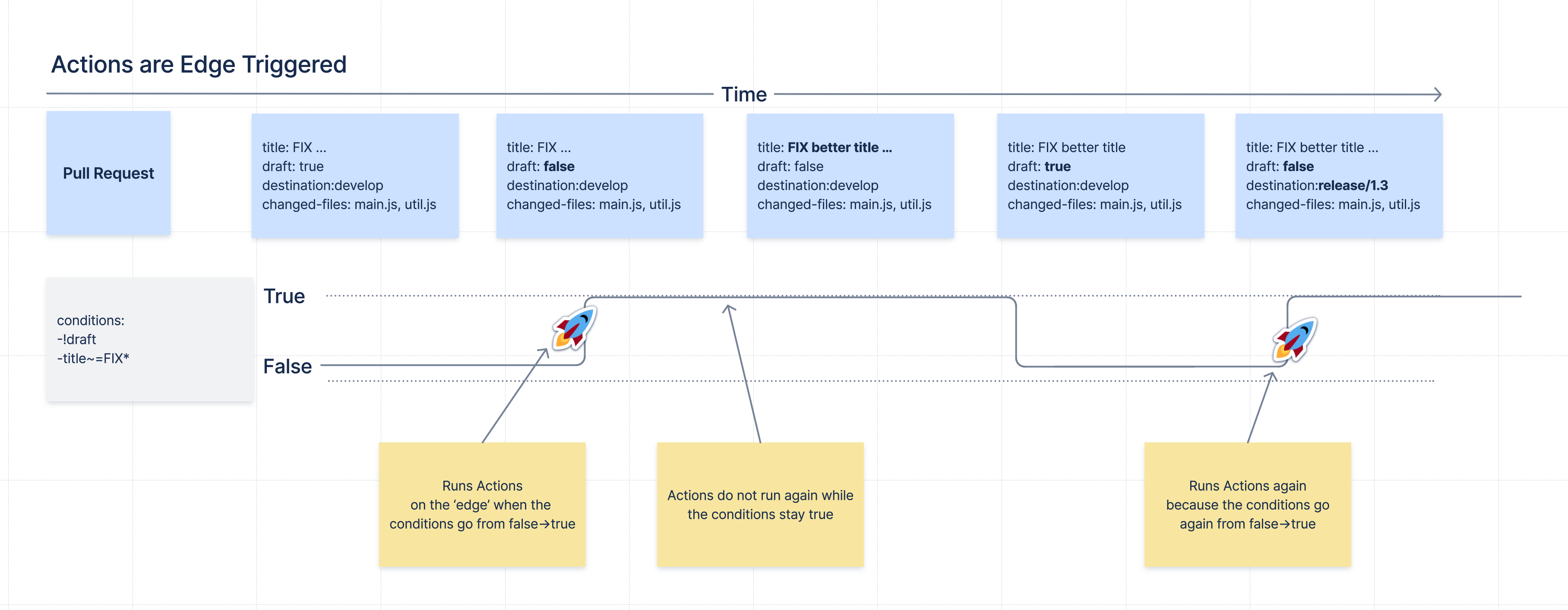
This concept is called Edge Triggering, as actions are triggered on the 'edge' of the signal when the conditions do change.
Run Actions More Often 🔬
Sometimes you need to run the actions of a workflow more often, for example every time new commits are made to the pull request.
For that, there is the retrigger-on section. If the value of one of the attributes in the retrigger-on section changes, it will "reset" the condition signal and if the conditions are currently met, a new edge trigger happens, and the workflow’s actions will run again.
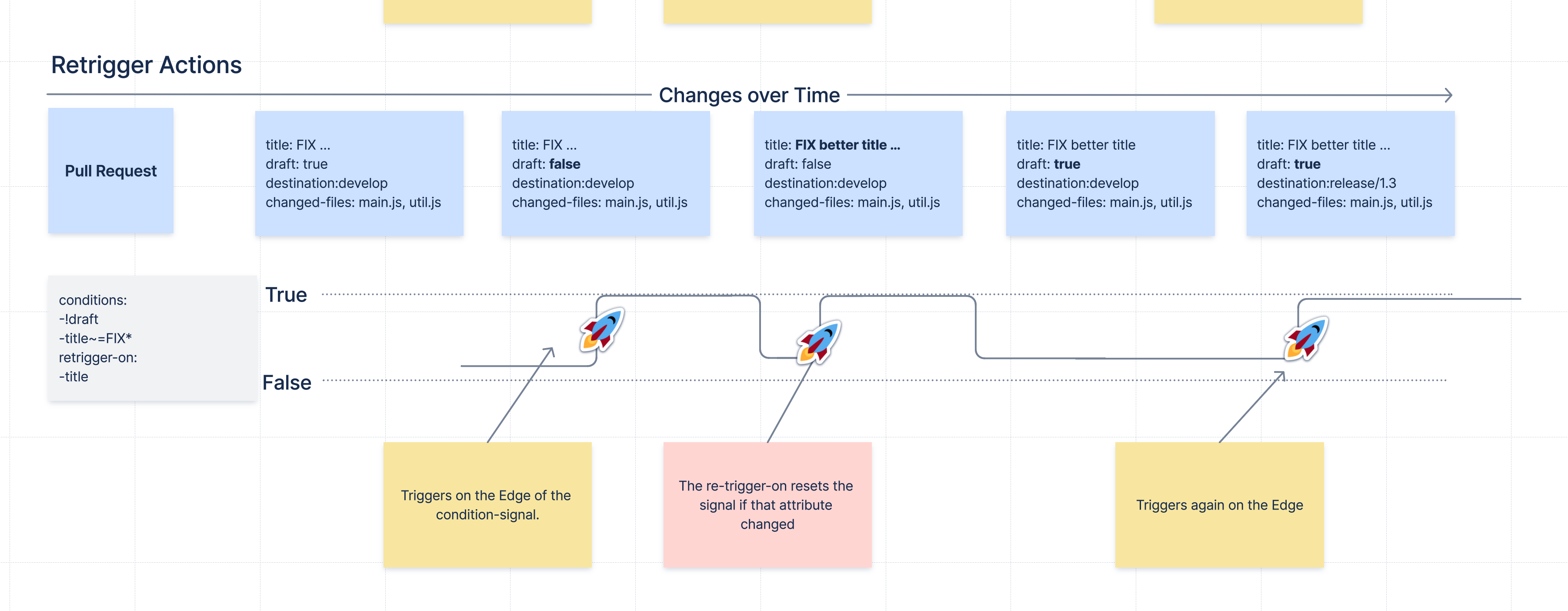
Examples:
workflows: - name: Reminder that changes for releases need extra care conditions: - destination ~= 'release/*' retrigger-on: - source-head-sha # Retrigger if commits change actions: - add-comment: content: | Be careful. PRs to ${destination} should only be for bugfix releases. - name: Send a reminder to the customer of a planned fix conditions: - destination ~= 'customer/*' - source ~= 'bugfix' retrigger-on: - destination # Retrigger if the destination changes actions: - add-comment: content: | Inform the customer about the planned customer specific bugfix - name: Add CodeOwner reviewers, and update if the are new commits conditions: - destination ~= 'customer/*' - source ~= 'bugfix' retrigger-on: - diff-change # Retrigger if contents of diff change custom-attributes: codeowners: rules: | **/*.java java-expert@our-company.com **/*.js javascript-expert@our-company.com actions: - add-reviewers: members: codeowners
Merge checks 🔰
Merge checks let you define extra rules, enforced while workflows are active, to protect your team’s repository from merging invalid PRs. For example, only accepting PR’s that follow your specific branch naming conventions.
Compared to Bitbucket’s own builtin merge checks, DevSensei allows you to use the same expressions and attributes as workflow conditions to customize exactly when checks should prevent a merge.
Example
Bitbucket has a builtin merge check to enforce a minimum number of approvals. However, the only configuration is a number. With DevSensei you can scope this further by, for example, restricting the check to specific branch patterns:
workflows: - name: stricter main checks conditions: - destination = 'main' merge-checks: - title: 2 approvals for main check: - count(approved-by) >= 2
Syntax support in IDE for DevSensei configuration 🔰
The app provides a YAML Schema for the devsensei.yaml file.
Benefits:
-
Auto-completion of YAML keys
-
Basic validations, (e.g. ensure that a workflow has actions)
-
Documentation of YAML elements within the editor
-
Showing code examples from the Spec as help
Download the YAML Schema from Bitbucket:
https://YOUR_BITBUCKET/rest/codeowners/1.0/devsensei/schema
Depending on your IDE, map that YAML Schema to files named devsensei.yaml.
IntelliJ IDEA & JetBrains IDE’s
-
Go to IntelliJ IDEA (or other Jetbrains IDE) settings
-
Search for
JSON Schema Mappings -
Add a new mapping:
-
Name:
DevSensei Schema file -
Schema URL: https://YOUR_BITBUCKET/rest/codeowners/1.0/devsensei/schema
-
Schema version:
JSON Schema version 7 -
File:
devsensei.yaml
-
VS Code
VS Code with the RedHat YAML plugin can either use an inline reference to the JSON Schema
# yaml-language-sever: $schema=https://YOUR_BITBUCKET/rest/codeowners/1.0/devsensei/schema workflows: # ...
or have a global mapping within the VS Code settings.json:
{ "yaml.schemas": { "https://YOUR_BITBUCKET/rest/codeowners/1.0/devsensei/schema": [ "devsensei.yaml" ] } }
Migration: From Code Owners to DevSensei 🔰
What advantages has DevSensei compared to Code Owners?
-
devsensei.yamlcan share common rules across repositories with includeddevsensei.yamlfiles called "Includes" to reduce duplication and maintenance efforts. -
Common configuration parts (e.g. reusing the list of reviewers) can be shared with YAML anchors.
-
DevSensei allows to build the automation you want with combining conditions and actions.
-
DevSensei currently supports
add-reviewers,unapprove,codeowners-check(and othermerge-checks),add-comment, andschedule-auto-merge. We will add more actions in the future to automate your pull request workflow. Let us know what actions you are looking for. -
devsensei.yamlis read from the default branch of your repository. This will reduce the maintenance efforts significantly when the automation for the repository needs changes.
How can I migrate from Code Owners to DevSensei?
To start using DevSensei from your existing CODEOWNERS file, you have two options:
-
a) Automated migration: migrate your
CODEOWNERSfile todevsensei.yamlwith the built-in migration support (see button Download generated devsensei.yaml). -
b) Manual migration: migrate your
CODEOWNERSsettings to their equivalents indevsensei.yaml.-
Copy the assignment rules from the
CODEOWNERSfile to therulessection ofcodeownerscustom attribute indevsensei.yaml. -
For the settings, use a combination of workflow
conditions, and options for theadd-reviewers,add-comment, andunapproveactions (see the Actions paragraph below). -
For the custom Code Owner groups (e.g.
@@@my-group @peter @anna), add acustom-groupscustom attribute to the workflow. -
For the merge checks, add a
codeowners-checkto themerge-checkssection of a workflow.
-
-
push the
devsensei.yamlfile to the root directory in the default branch of your repository -
enable DevSensei under
repository settings -> DevSensei | Code Owners -> DevSensei Workflows -> Enabled -
when the app sees a
devsensei.yamlfile, it will use that instead ofCODEOWNERS.
|
Note |
DevSensei reads the |
Below you can see both a CODEOWNERS file and the equivalent devsensei.yaml file. This should help you to migrate from your Code Owners rules to the new YAML format (see the matching numbers for the equivalents).
The format of the Code Owners rules is the same, so you can copy that to the rules section of the codeowners custom attribute.
CODEOWNERS
CODEOWNERS.destination_branch_pattern main # (1) CODEOWNERS.destination_branch_pattern release/* # (2) CODEOWNERS.toplevel.subdirectory_overrides enable # (3) NOT SUPPORTED, see details in next section CODEOWNERS.toplevel.assignment_routing random 2 # (4) CODEOWNERS.toplevel.assignment_limit 20 # (5) CODEOWNERS.toplevel.create_pull_request_comment enable # (6) CODEOWNERS.toplevel.auto_unapprove_on_change enable # (7) CODEOWNERS.source_branch_exclusion_pattern hotfix/* # (8) @@@MyDevs @PeterTheHacker @PeterTheJavaExpert ann@scala.lang @@JSDevs * @PeterTheHacker *.java @PeterTheJavaExpert *.js @PaulTheJSGuru @@JSExperts "a/path with spaces/*" docs@example.com !ci/playgrounds.yml src/components/**/*.js @@MyDevs Check(@@MyDevs >= 2)
devsensei.yaml
shared: - custom-groups: MyDevs: - PeterTheHacker - PeterTheJavaExpert - ann@scala.lang - @@JSDevs workflows: - name: Add Code Owners conditions: - or: - destination = 'main' # (1) - destination ~= 'release/*' # (2) - source ~!= 'hotfix/*' # (8) retrigger-on: - diff-change # If you want update Code Owners when the pull request code is updated custom-attributes: custom-groups: MyDevs: *MyDevs codeowners: rules: | * @PeterTheHacker *.java @PeterTheJavaExpert *.js @PaulTheJSGuru @@JSExperts "a/path with spaces/*" docs@example.com !ci/playgrounds.yml src/components/**/*.js @@MyDevs actions: - unapprove: # (7) members: codeowners - add-reviewers: members: codeowners assignment-routing: random: 2 # (4) assignment-limit: 20 # (5) - add-comment: # (6) report-from: add-reviewers merge-checks: codeowners-check: | Check(@@MyDevs >= 2)
Code Owners Settings NOT supported by DevSensei equivalents 🔬
|
Code Owners feature |
Why not supported / Alternative? |
|---|---|
|
|
Manually include rule files of sub directories |
|
Note |
To replicate the previous behavior of the sub-dir override feature with DevSensei workflows, you must:
Example: if you have
|
Reference: devsensei.yaml
Workflows 🔰
Each workflow is meant to automate specific tasks for the pull requests of your team.
Properties
|
Attribute |
Definition |
|---|---|
|
|
The name of the workflow. Must be unique in a repository. |
|
|
A set of conditions to be met for the actions of the workflow to be executed for a pull request. If empty then all pull requests will match. |
|
|
A set of expressions. Causes additional trigger for actions each time the value changes while the condition is currently met. retrigger-on: # on change to an attribute's value - destination # on a change to the contents of the PR's diff. - diff-change |
|
|
A set of actions to be executed each time the |
|
|
A set of rules that are continuously checked. If any rule fails to pass then the PR is prevented from merging. |
|
|
A set of configurable attributes that can be used within |
|
|
A workflow with the same name can be overridden in the main devsensei.yaml file. If so, the workflow object must have
includes: - other.yaml workflows: # overriding included workflow - name: I am overridden overrides: true
workflows: # original definition of workflow - name: I am overridden conditions: #... actions: #... |
Conditions 🔰
The conditions property of a workflow is configured with a list of conditions.
Condition evaluation
Each condition is a boolean expression, so composition with and and or obeys the usual rules for boolean algebra.
If there are no conditions (i.e. there is no mapping, or an empty list), then the condition is always met by default, so any action in the workflow run at least once. This means that each additional condition further constrains the cases where actions should be applied. If there are more than one condition in a workflow’s conditions property, then they must be all true simultaneously for the overall condition to be met (i.e. they are combined with and implicitly).
Conditions are dynamic expressions, and can retrieve and compare metadata (known as attributes) associated with the current pull request. Conditions are evaluated when a pull request is created, whenever the pull request or its various metadata changes.
Condition attributes
These are the various attributes available to use in conditions, retrigger-on, and merge-checks. Each attribute results in a typed value when evaluated.
|
Note |
currently only attributes marked as watchable can be used in the |
|
Condition Attribute |
Watchable |
Type |
Meaning |
|---|---|---|---|
|
|
✅ (yes) |
|
The pull request title |
|
|
✅ (yes) |
|
Source branch of pull request |
|
|
✅ (yes) |
|
Destination branch of pull request |
|
|
✅ (yes) |
|
Destination repository of pull request |
|
|
✅ (yes) |
|
The SHA-1 hash of commit of the HEAD ref on the source branch |
|
|
✅ (yes) |
|
Is it a draft pull request |
|
|
✅ (yes) |
|
Whether the Pull Request currently has conflicts with the target branch. |
|
|
❌ (immutable) |
|
The user who created the PR. |
|
|
💡 (planned) |
|
The set of tasks that are still open in the PR. |
|
|
💡 (planned) |
|
The set of username slugs corresponding to users who have approved the PR. |
|
|
💡 (planned) |
|
The set of users who are reviewers of the PR and their review status. Has properties |
|
|
💡 (planned) |
|
The set of all files that are affected by the pull request. Has properties |
|
|
💡 (planned) |
|
The set of builds for the most recent commit for the pull request. Has properties |
|
|
💡 (planned) |
|
The set of users who are watchers of the PR. Watchers are people that interacted with the pull request. See Bitbucket documentation. |
|
|
💡 (planned) |
|
List of commits in this PR. Has properties |
|
|
💡 (planned) |
|
Set of Jira keys mentioned in all commit messages. |
Aggregate condition operators 🔬
There are two logical operators that can compose a list of conditions
|
Condition Operator |
Meaning |
|---|---|
|
|
All conditions must be fulfilled |
|
|
At least one of the conditions must be fulfilled |
Custom Attributes 🔰
Custom attributes are configurable attributes to be used within a workflow, for example as part of the configuration of an action or a merge check.
Available custom attributes are:
-
custom-groups -
codeowners
Custom Groups
Custom groups define a set of users grouped together as a single entity. There are similar to Bitbucket or Reviewer user groups, but they are only defined within a workflow.
A group is defined by a name and a list of identifiers. An identifier can be
-
a reference to a user (as individual via email or username) (e.g.,
@aliceoralice@domain.com), or -
a reference to another group (custom group, Bitbucket group or reviewers group) using
@@<group-name>.
Syntax
Custom groups are defined as a yaml mapping from the name of the group to the list of identifiers within that group.
Example:
custom-groups: frontend-devs: - alice - bobby@domain.com - @@admins backend-devs: - bobby@domain.com - charly
Code Owners
The codeowners custom attributes is defined by a rules member, configuring what files are owned by which people.
Syntax
The rules are defined using a multi-line string where each line follows one of the two following patterns:
-
<file pattern> <code owners>: to assign files to some code owners -
!<file pattern>: to exclude files from being assigned.
(Rule line order matters: the last matching line wins.)
See our complete reference for more context and information.
Example:
codeowners: rules: | * @alice bobby@domain.com frontend/ @@frontend-devs backend/ @@backend-devs devsensei.yaml @@admins !ci/playgrounds.yml
Expressions 🔬
Expressions are small computations on Pull Request attributes. Expressions are most useful in workflow conditions and custom merge checks. Expressions can be as simple as a constant (like a number or a string) or an attribute value, but expressions can also be more complex manipulation of attributes.
Some examples of expressions are
-
draft -
true -
'Hello World' -
'PR ${title} opened by ${author}' -
source ~= 'bugfix/*' -
count(approved-by) -
builds.successful -
forall(changed-files, $1 ~= '**/*.js')
Expressions can be composed in any form or fashion using operators described below, as long as type requirements are fulfilled. If an expression does not type-check (e.g., source > 3), it will make the devsensei.yaml file invalid.
|
Note |
Expressions can return any type, but expressions involved in conditions have to return a boolean. For example, even though |
Expression types
Here are the following types that can be involved in expressions
|
Type name |
Description |
|---|---|
|
|
a wildcard meaning any type is accepted. |
|
|
a value that is one of either |
|
|
any UTF-8 text value. |
|
|
an integer value (between |
|
|
a sequence of elements, may contain duplicates. |
|
|
an aggregate of unique elements, may have optional properties, (e.g. |
|
|
A registered application user; can be identified by both username and email. |
|
|
a lambda function expression taking an argument of type |
String Template Literals
A literal string also supports templating. Arbitrary expressions can be spliced in with ${expr} if expr is convertible to string.
Template Examples
-
'PR: ${title}'directly embeds thetitleattribute of typestring. -
'Found ${count(commits)} commits'embeds the expressioncount(commits)of typeintby automatic conversion tostring.
String Conversions
Expressions of the following types may be directly inserted into a string template: int, boolean, string.
|
Note |
💡 We plan to support more data types in string templates soon. Let us know if you need this for your use case. |
Expression Operators
Use Operators to transform expressions into more complex ones. For example, to compare two int values or to count the number of elements in a set. Operators can be infix (only for binary operators), prefix or call. Infix operators are placed within their arguments, prefix operators must be placed before their arguments, and call operators must enclose their argument(s) in parenthesis, separated by commas.
|
Operator |
Meaning |
Type |
Position |
Example |
|---|---|---|---|---|
|
|
Glob match with a branch pattern. |
|
|
|
|
|
Regex match |
|
|
|
|
|
Glob or regex match which returns true when at least one file path in the set matches. (only |
|
|
|
|
|
Negation of glob or regex match (i.e. no matches) |
|
|
|
|
|
Equals |
|
|
|
|
|
Not equals |
|
|
|
|
|
Negate a boolean attribute (use of |
|
|
|
|
|
Number or string length comparison |
|
|
|
|
|
Computes the number of elements in a |
|
|
|
|
|
Checks for membership of an element in a |
|
|
|
|
|
Negates a boolean expression |
|
|
|
|
|
Checks whether the items in the first argument collection all satisfy the predicate specified by the lambda in the second argument. Always returns |
|
|
|
|
|
Checks whether there is at least one item in the first argument collection that satisfy the predicate specified by the lambda in the second argument. Always returns |
|
|
|
Properties 🔬
Some attributes have properties with a sub-set of the data.
Syntax
<attribute>.<property>
Applying a property will access the property of the attribute.
|
attribute/type |
Property |
Meaning |
|---|---|---|
|
|
|
The successful builds |
|
|
The failed builds |
|
|
|
The builds that are in progress |
|
|
|
|
Only the new files that were not seen before |
|
|
Only the files that will be deleted after merging |
|
|
|
Only the files that changed (and possibly also moved). |
|
|
|
Only the files that were not changed, but were moved |
|
|
|
|
Only the reviewers who have approved the PR. |
|
|
Only the reviewers who have requested changes on the PR. |
|
|
|
Only the reviewers who have not completed their review. |
|
|
|
|
list of all tiles of the commits. |
|
|
list of all commit messages. |
|
|
|
set of all authors of all the commits |
|
|
|
|
The title of the commit message (the first line) |
|
|
set of Jira keys in commit. Eg |
Lambda functions 🔬
Some functions require to have a lambda function as argument, for example exists or forall. A lambda function can be composed as any usual expression, where the argument of the lambda is represented by $1.
For example, the following expressions are valid lambdas:
-
$1 ~= 'alice' -
'{$1}' ~= 'alice'(the same via conversion.) -
!$1 -
count($1) < 50 -
contains(reviewers.approved, $1)
As a complete example, the following expression checks that at least one reviewer is called "alice":
-
exists(reviewers, $1 = 'alice'),
in this expression reviewers is a collection of type set, and $1 is a placeholder that will be substituted with each reviewer in the collection until a true result is found.
Syntax reference
Expressions can be
-
a boolean value, e.g.
trueorfalse -
an integer value, e.g.,
7,-6,+2 -
a string literal, enclosed in single quotes, e.g.,
'Hello world'or'from: ${source}'. Within quotes, single quotes'and backslash\must be escaped by preceding them with a backslash. Template splice openings${can be escaped by a single backslash. -
an attribute value, e.g.,
source,approved-by -
of the form
<expression> <infix operator> <expression>, e.g.,source ~= 'bugfix/*' -
of the form
<prefix operator> <expression>, e.g.,!draft -
of the form
<call operator>(<expression> [, <expression>]*), e.g.,count(open-tasks),contains(reviewers, 'user') -
of the form
<expression>.<property>, e.g.,changed-files.modified -
of the form
( <expression> ), e.g.(changed-files ~= '**/*.js') = true
Outside of string literals, spaces are insignificant.
Retrigger On 🔬
The retrigger-on section is optional. If configured, it defines a set of expressions that are continuously evaluated, similar to conditions.
Example
retrigger-on: - destination - diff-change
It provides more fine-grained control over when edge-triggering occurs. Normally, actions only run on the "edge" when the condition changes from "not-met" to "met". For example, if attribute values change, but the condition is still met, then normally actions will not run again.
However, if retrigger-on is configured, then whenever one of its expression values changes while the condition is met, the signal for the condition will temporarily flip, enabling a new edge-trigger even though the condition is already met.
You can consider the behavior similar to two electrical signals: condition (A), and retrigger-on (B), combined with a logic gate (A & !B). Signal B is only activated in the instant where a change occurs, but otherwise deactivates, which creates more "edges" in the combined signal.
Concept of retrigger-on
condition (A): ___^^^^^^^^^^^___^^^__ retrigger-on (B): ______^___^___________ A & !B: ___^^^_^^^_^^^___^^^__ EdgeTrigger: ___^___^___^_____^____
Without the retrigger-on section the workflow actions would only run twice. The effect of retrigger-on makes it so that the workflow actions actually run 4 times instead.
Retrigger Expressions
Concretely, in a single expression you can either specify a watchable attribute, or observe changes to the combined diff.
|
Kind |
Syntax |
Result |
|---|---|---|
|
|
|
the value of the attribute. Note: the attribute must be watchable |
|
|
|
Compute the overall change in the diff, ignoring other commit metadata. |
Look at the attributes table to see which are watchable. Let us know if you would like more kinds of checks to be supported in this section.
Actions 🔰
List of available actions that fuel your automation.
Let us know if you miss an action.
add-reviewers
Suggests and/or adds reviewers to a pull request. (See also add-watchers for watchers instead)
|
Action option |
Definition |
|---|---|
|
|
Decides which users are selected to be added as reviewers. Choice 1: requires Code Owners custom attribute to be defined. Members will be resolved according to the rules applied to the overall diff of the PR. - add-reviewers: members: codeowners Choice 2: identifier list Identifiers are either a user slug, an email address or a group reference (either to a custom group, or to a Bitbucket group). Group references are resolved transitively to all members of the group. - add-reviewers: members: - user1 # user slug - user2@domain.com # email address - @@my-group # group reference |
|
|
number limit the number of reviewers that can be assigned to a pull request. This feature is useful to prevent unwanted notifications in the case of manipulation mistakes (e.g., creating a Pull Request from the wrong branch, or an unhappy rebase) - add-reviewers: assignment-limit: 20 |
|
|
reduce the number of reviewers that are automatically assigned to a pull request. Currently, the only available method of assignment is at random. - add-reviewers: assignment-routing: random: 2 |
|
|
choice from
- add-reviewers: strategy: suggest-only |
add-watchers
Adds watchers to a pull request. (See also add-reviewers for reviewers instead)
|
Action option |
Definition |
|---|---|
|
|
Decides which users are selected to be added as watchers. Choice 1: requires Code Owners custom attribute to be defined. Members will be resolved according to the rules applied to the overall diff of the PR. - add-watchers: members: codeowners Choice 2: identifier list Identifiers are either a user slug, an email address or a group reference (either to a custom group, or to a Bitbucket group). Group references are resolved transitively to all members of the group. - add-watchers: members: - user1 # user slug - user2@domain.com # email address - @@my-group # group reference |
unapprove
Unapprove all or some of the approved reviews in the Pull Request.
|
Action option |
Definition |
|---|---|
|
|
Decides which users are selected to be unapproved. Choice 1: unapprove all users who are currently reviewers. - unapprove: members: all Choice 2: requires Code Owners custom attribute to be defined. Members will be resolved according to the rules applied to the diff of the most recent change to the PR. - unapprove: members: codeowners Choice 3: identifier list Identifiers are either a user slug, an email address or a group reference (either to a custom group, or to a Bitbucket group). Group references are resolved transitively to all members of the group. - unapprove: members: - user1 # user slug - user2@domain.com # email address - @@my-group # group reference |
add-comment
Adds a single comment or task to a pull request. Can either be custom content, or automated reporting of action results.
|
Action option |
Definition |
|---|---|
|
|
( add-comment: content: 'Warning! too many commits: found ${count(commits)}' |
|
|
( add-comment: report-from: add-reviewers DevSensei will use a builtin formatter to report the results of the action in a readable format. For now: 💡only |
|
|
( add-comment: content: | This PR is missing a Jira issue key in the title. Please add it. task: true |
schedule-auto-merge
Schedules this pull request to be automatically merged once all merge checks are clear.
|
Note |
|
|
Important |
If your repository uses branch permissions to prevent all changes on a branch, then the |
|
Action option |
Definition |
|---|---|
|
|
Optional, possible values: Merge strategy used for the pull request. When not specified, the default merge strategy of the repository will be used. Strategy must be allowed by the repository configuration. schedule-auto-merge: strategy: squash |
|
|
Optional ( schedule-auto-merge: strategy: no-ff message: Merged PR ${title} by DevSensei policy |
|
|
Optional ( schedule-auto-merge: merge-as-author: true |
|
|
Optional ( |
Prerequisites
This action requires:
-
Bitbucket 8.15 or newer
-
The Bitbucket Auto-Merge feature must be enabled for the repository
Auto-Merge Behavior
When the action runs, it submits an Auto-Merge for this pull request. Bitbucket then will merge the pull request, depending on its state:
|
Pull Request State |
What Bitbucket Does |
|---|---|
|
Pull request is mergeable |
Immediately merges it |
|
Merge checks are failing |
Merges as soon as merge checks pass |
|
Merge conflict is present |
No Auto Merge Request is submitted |
|
A commit changes/new commits added while pull request is open |
Auto Merge status is cancelled, and DevSensei will not re-submit a Auto Merge Request until the workflow is retriggered. |
Check the Bitbucket documentation for more details on how auto merge behaves.
Because the Auto-Merge request may be cancelled by new commits, you may decide to ask again for auto-merging. See the Retrigger On section for more details
Auto-Merge Use Cases
The schedule-auto-merge action makes it simpler to automatically accept lower risk pull requests by merging quickly. As it is based on Bitbucket’s Auto Merge feature, after scheduling, Bitbucket will still prevent merge if there is a veto from one of the merge checks enabled for your repository (for example anything in the merge-checks section).
|
Use Case |
Example Workflow |
|---|---|
|
Fast track code based on a |
conditions: - source ~= 'hotfix/*' actions: - schedule-auto-merge: strategy: no-ff message: Hotfix branch ${source} |
|
Fast track code based if build succeed and is from a trusted bot-author, e.g. one that only submits library dependency updates. |
conditions: - author = 'deps-updater-bot' - count(builds.successful) > 1 - count(builds.in-progress) = 0 - count(builds.failed) = 0 actions: - schedule-auto-merge: strategy: no-ff message: dependency updates |
|
Merge when the developer requests to skip reviewers, for example by adding a You can also achieve this using the DevSensei Auto Merge feature, which has the benefit of an interactive graphical user interface, and when skipping is requested it automatically removes the "Codeowners minimum approvals" merge check. Alternatively, instead of checking the |
conditions: - title ~= '[SKIP]*' actions: - schedule-auto-merge: strategy: no-ff message: skipped reviewers |
|
Merge when a PR is without conflicts and not in a draft state. |
conditions: - "!draft" - "!conflicts" actions: - schedule-auto-merge: strategy: no-ff message: no draft or conflict |
|
Merge when a required number of approvals is met (Equivalent to SHIP/SHOW/ASK). |
conditions: - title ~= '[ASK>1]*' - count(approved-by) > 1 actions: - schedule-auto-merge: strategy: no-ff message: no draft or conflict |
Other Auto-Merge Use Cases (Planned)
The following ideas rely upon planned or otherwise unimplemented features. Contact support to let us know your use case.
-
Schedule merge when a no reviewer requested changes. (requires new attribute)
-
Wait until another PR has been merged (e.g. merge queue)
-
Check total size of change is within a small range (requires a new attribute).
add-codeowners
|
Note |
This action is now deprecated and divided into several smaller, more regular, features. See actions |
Adds Code Owners as reviewers to a pull request.
|
Action option |
Definition |
|---|---|
|
|
number limit the number of Code Owners that can be assigned to a pull request. (opt-in) This feature is useful to prevent unwanted notifications in the case of manipulation mistakes (e.g., creating a Pull Request from the wrong branch, or an unhappy rebase) - add-codeowners: assignment-limit: 20 |
|
|
reduce the number of Code Owners that are automatically assigned to a pull request. (opt-in) Currently, the only available method of assignment is at random. - add-codeowners: assignment-routing: random: 2 |
|
|
The Code Owners rules and merge checks. For existing - add-codeowners: rules: | * @jordan jordan@example.com /backend/ @@backendies /frontend/ @@frontendies |
|
|
Define custom Code Owners groups. - add-codeowners: rules: | pipelines.yml @@admins backend/ @@backendies src/components/**/*.js @@frontendies custom-groups: admins: - @bobby backendies: - @jordan - john.doe@localhost.ch frontendies: - @charly - @@admins |
|
|
Remove approval if owned code changes. - add-codeowners: auto-unapprove-on-change: true |
cancel-auto-merge (Planned)
Cancels any pending auto merge. This action is planned. Contact support to let us know your use case.
Merge Checks 🔰
List of enforced checks that protect against merging unless they all succeed.
Let us know if your use case is not covered.
Merge checks reuse the same expressions as conditions, and can be grouped with a custom title. DevSensei also offers alias merge checks for common use cases.
Custom Check
Example
merge-checks: - title: block when PR title requests check: - title ~!= '[block]*'
Properties
|
Property |
Definition |
|---|---|
|
|
a list of conditions that must all be met for the check to pass. The list of conditions are implicitly combined with |
|
|
a ( |
Alias: Minimum Approvals
Equivalent to a custom merge check with the single condition count(approved-by) >= n for positive number n.
Example
merge-checks: - minimum-approvals: 1
Properties
|
Property |
Definition |
|---|---|
|
|
a positive ( |
Alias: Minimum Successful Builds
Equivalent to a custom merge check with the conditions:
-
count(builds.successful) >= nfor a positive numbern. -
count(builds.failed) = 0disallow failed builds -
count(builds.in-progress) = 0wait for all builds to be complete
Example
merge-checks: - minimum-successful-builds: 1
Properties
|
Property |
Definition |
|---|---|
|
|
a positive ( |
Alias: No Open Tasks
Equivalent to a custom merge check with the single condition count(open-tasks) = 0.
Add this merge check by adding the string no-open-tasks to the workflow merge-checks list.
Example
merge-checks: - no-open-tasks
Properties
This merge check alias has no property.
Code Owners Merge Check
This merge check enforces rules as described in the Code Owners documentation. For existing CODEOWNERS users, copy your merge checks to this section.
Properties
|
Property |
Definition |
|---|---|
|
|
a multiline string, where each line is an independent rule, and each line must be simultaneously true. Combine multiple rules on the same line with |
Example
merge-checks: - codeowners-check: | (Check(@@MyDevs >= 2) | Check(@@JavaExperts >= 1))
Merge Check Use Cases
The merge-checks section gives more control over which pull requests should be merged, for example applying unique checks to specific branch patterns.
|
Use Case |
Example Workflow |
|---|---|
|
Enforce that there are no incomplete tasks |
merge-checks: - title: require no incomplete tasks check: - count(open-tasks) = 0 |
|
Enforce that the build passed, and no other build is in progress or failed |
merge-checks: - title: require a successful build check: - count(builds.successful) > 1 - count(builds.in-progress) = 0 - count(builds.failed) = 0 |
|
Enforce that on PRs to the main branch there are at least 3 approvers |
workflows: - name: strict main checks conditions: - destination = 'main' merge-checks: - title: 3 approvers on main check: - count(approved-by) >= 3 |
|
Enforce branch naming conventions |
merge-checks: - title: Follow branch pattern check: - or: - source ~= 'feature/*' - source ~= 'release/*' - source ~= 'hotfix/*' - source = 'main' |
|
Prevent merge to release branch from a feature branch. |
workflows: - name: strict release checks conditions: - destination ~= 'release/*' merge-checks: - title: never release from feature check: - source ~!= 'feature/*' |
|
Restrict PRs on certain branches to be specific author. |
workflows: - name: strict release author checks conditions: - destination ~= 'release/*' merge-checks: - title: enforce PR author check: - author = 'release-admin' |
|
Prevent merge PR with a long title. |
workflows: - name: Formatting checks conditions: merge-checks: - title: enforce max title length check: - title <= 50 |
|
Ensure there are Jira issues references and commit titles follow a guide line |
workflows: - name: Commit message checks conditions: merge-checks: - title: Ensure that Jira key issues is referenced check: - count(jira-keys) > 0 - title: Ensure your commit title starts with FIX,FEATURE or MISC check: - forall(commits.titles, $1~=regex('(FIX|FEATURE|MISC).*')) |
|
Prevent merge PR with too many file changes. |
workflows: - name: Size checks conditions: merge-checks: - title: enforce max changed files check: - count(changed-files.added) <= 50 |
|
Prevent merge if draft or conflicting. This matches Bitbucket’s own behavior so is unnecessary, but demonstrates how you could create equivalent checks with conditions. |
merge-checks: - title: Not draft or conflicting check: - not(draft) - not(conflicts) |
Planned Use Cases
The following ideas rely upon planned or otherwise unimplemented features. Contact support to let us know your use case.
Fine-grained equivalents to built-in Bitbucket merge checks
Supporting the following would allow to create finer grained checks (e.g. by filtering on destination branch pattern):
-
Require no "requested changes" status
Support non-functional requirements
-
Require that a pull request has been open long enough to be seen (time-based condition)
-
Prevent merge to a release branch on a specific day.
More fine-grained attributes
-
check text contents of
open-tasks, e.g. if your team uses a marker to indicate some tasks can be ignored. -
check specific user in
approved-by.
Code Owners merge checks
Over time we hope to migrate the merge checks from the add-codeowners action, starting with the codeowners-check option. We could possibly make them more flexible, for example check the intersection of approved-by with the added code owners.
Share Configuration with Includes 🔬
With includes, common Devsensei workflows can be shared both across repositories as well within projects in a monorepo.
To include a devsensei.yaml file from another repository, use this syntax:
includes: - repository: shared-configs file: project-devsensei.yaml
Only repositories of the same Bitbucket project are supported.
The Bitbucket users require READ access to the repository with the shared configuration. Otherwise users will get permission issues, because they cannot access the required configuration.
When a plain YAML file path is specified, the included file is read from the same repository:
includes: - common/devsensei.yaml
-
The files are read from the latest commit of the default branch
-
Only one level of includes are support (no recursion supported)
Sharing Parts of the Configuration with YAML Anchors 🔬
Use YAML Anchors to define reusable content in the same YAML file.
Example showing how to share conditions across workflows:
shared: conditions: - &non-hotfix-to-release-branch - source~!=hotfix/* - destination~=release/* workflows: - name: comment conditions: *non-hotfix-to-release-branch actions: - add-comment: content: | Hotfix branch expected as source branch when merging into release branches. Source was ${source}. - name: codeowners custom-attributes: codeowners: rules: | *.js @peter conditions: *non-hotfix-to-release-branch actions: - add-reviewers: members: codeowners
-
Anchors can be used for any content. For example, to define reusable custom user groups, or conditions.
-
Reference must reference anchors in the same file. It is not possible to define an anchor in one file, and reference it from another file.
-
Anchor names cannot contain the
[,],{,}, and,characters. -
Anchors can be defined anywhere in the file, although we encourage to use the
sharedsection at the top of the file for clarity and easier maintenance.
Configuration-Changes and Existing Pull Requests 🔬
DevSensei reads the configuration always from the default branch. That means that all open pull requests will use the same configuration and changes in the configuration affect all pull requests.
When you change the configuration, then when DevSensei runs the next time, the new configuration is applied.
Table 1. The next time DevSensei runs:
|
Configuration change |
Effect on Existing Pull Request |
|---|---|
|
New Workflow is Added |
The workflow’s actions are applied if the conditions are met |
|
Workflow is Renamed |
Workflows are identified by name, therefore this acts as if a new workflow is introduced. See above |
|
|
The next time actions are running, the new configuration for the action is used |
|
|
Then new conditions are checked the next time DevSensei runs |
|
|
The condition signal is reset when the |