
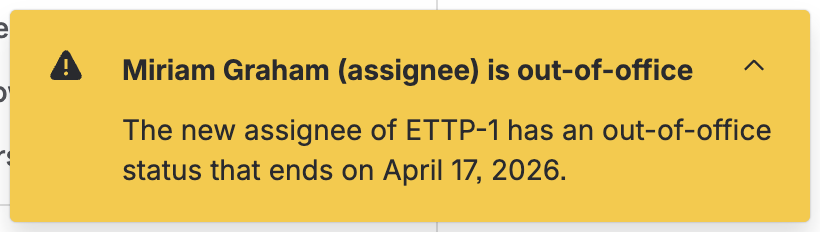
This feature allows Jira users to view the out-of-office status (automatic reply) of users directly when assigning them on a work item. Once assigning is complete, a flag will pop up in the issue view indicating that the new assignee has an out-of-office status.
Supported fields
The flag will currently appear for the following fields on a work item.
|
Field |
Description |
|---|---|
|
Assignee |
Default field on all work items |
|
Request participants |
This field is provided by default in Jira Service Management projects |
Automatic reply
Microsoft Outlook offers a feature to set an automatic reply when out-of-office. Out of Office Sync for Jira and Microsoft is using this information.
This information includes the scheduled out-of-office status on the Outlook calendar of the newly added user and it has two distinct states:
-
user has scheduled an out-of-office status with no return date
-
user has scheduled an out-of-office status with a return date
All-day event
If configured by the administrator, the flag will also appear if the newly added user has an all-day calendar event set with status “out of office“. The message shown will also point out that it is an all-day event.
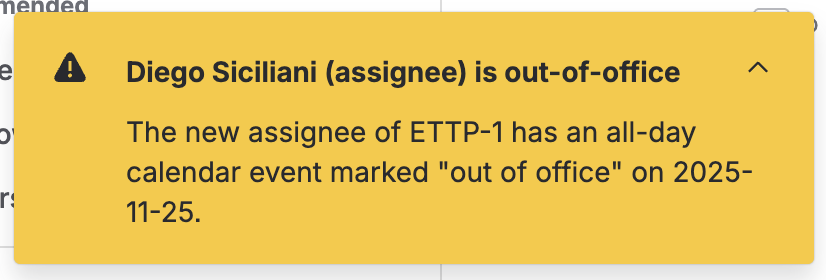
When a user has set an automatic reply and an all-day event, only the message for the automatic-reply will appear.
The availability of this information immediately after defining the new user can significantly reduce the likelihood of missed deadlines and enable teams to promptly address any potential delays. By having this information at hand, teams can make informed decisions and ensure that tasks are assigned to the appropriate person at the right time, thereby promoting efficient and effective workflow.