
Who?
A process manager works for an international automotive company. They are using Confluence for Cloud to create and maintain all process documentation.
.png?cb=4a84c029b5ac80dbb18e7dfd166070b1)
What? - Use Case
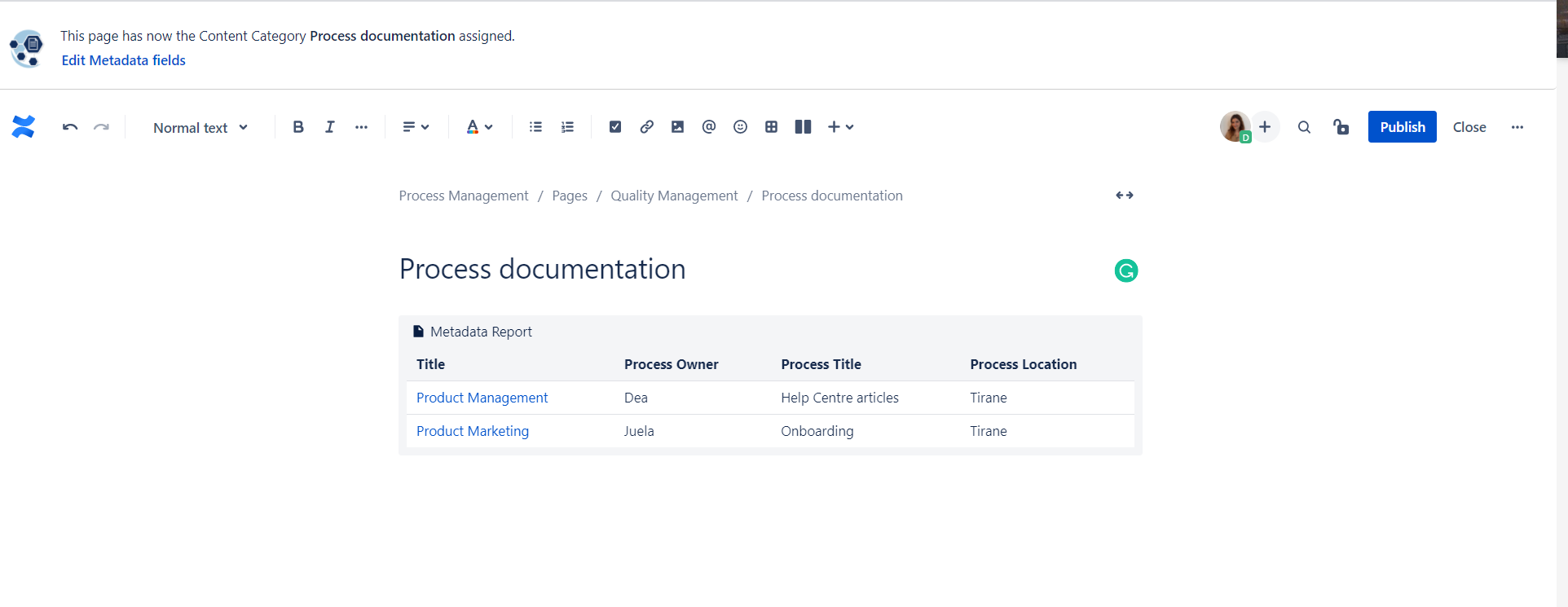
The process manager wants to create a process overview page where every employee will see an overview of all processes relevant to their location. He uses the Metadata Reporting to filter for a specific location and then have that macro displayed:
-
The manager chooses the Content Category “Process documentation”.
-
After entering all the metadata, they click on the plus sign to access the Macro Browser, and write “Metadata Report”.
-
To create the Macro Report and filter it for a specific location, they select the Content Category they want to display (in this case, Process Overview) and add the Metadata filter linked to the Process Location.
.png?cb=98b31f0d422bb3856825efd32ca91099)
And here’s the result:
Why? - Added Value & Benefits
- Effective content filtering
- Accurate reporting for process management
- Employee engagement
How? - Feature Used
Metadata Report Macro. If you’d like to read more about the feature click here.