Parameter
|
Name |
Description |
Type |
This is a required field |
Default |
Values |
|---|---|---|---|---|---|
|
Filename patterns
|
A comma-separated list of filename regular expression patterns. Example: .*pdf |
string |
|
|
|
|
Style
|
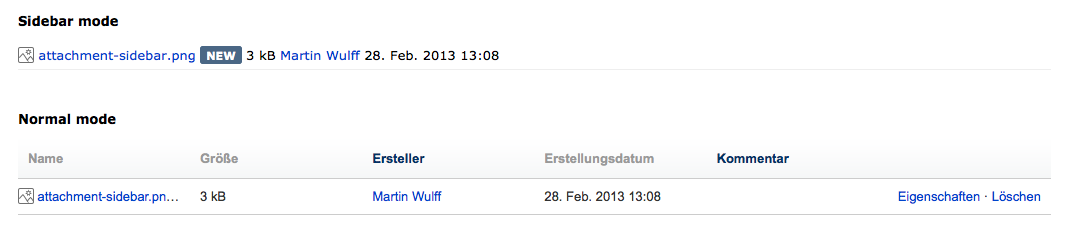
The display mode of the list. Sidebar = bullet-list |
enum |
|
full |
full, sidebar |
|
Sort by
|
Specify the sort field for attachments. Valid values are date, size and name. The default sort order is reverse chronological (descending) for date, largest to smallest for size, and alphabetical for name. Note that people viewing the page can change the sort order by clicking on the column headings. |
enum |
|
date |
date, size, name |
|
New flag
|
If a value is set, a new indicator will be displayed if the attachment was created within the last [newFlag] days. |
string |
|
0 |
|
|
Maximum
|
Maximum number of attachments to be displayed |
string |
|
|
|
|
Maximum length of the title
|
Maximum character length of the attachment titles. If a title is longer than this it will be truncated at the end of the word and "..." will be added. |
int |
|
35 |
|
|
ContentId
|
If the contentID of a page or blog is given, the macro displays the attachment list of the specified content object. |
string |
|
|
|
|
Show creation date
|
Display the creation date of each attachment. |
boolean |
|
true |
|
|
Show author
|
Display the author of each attachment. |
boolean |
|
true |
|
|
Show file size
|
Display file sizes in the list. |
boolean |
|
true |
|
|
Show comment
|
Display comments. |
boolean |
|
true |
|
|
Show actions
|
Show actions like properties and delete, if the user is permitted to exceute these actions. |
boolean |
|
true |
|
|
Icon
|
Sets an icon that will be displayed for each attachment, independent of file type. |
enum |
|
|
icon-page, icon-blog |
|
Title from comment
|
If set to true, comments are used as attachment title if not empty. |
boolean |
|
false |
|
Examples
Filter Attachments by file name
{gu-attachmentlist:patterns=.*jpg,.*gif}
Use a comma-separated list of regular expressions to specify the file extensions of the type of attachments you want displayed.
Note
The patterns are regular expressions, so to match a file suffix of 'jpg', use .*jpg, not *.jpg.
Here's a detailed tutorial on regular expressions.