General App Documentation
Breadcrumbs

SBB Widgets for Confluence


Look up SBB CFF FFS timetables and station boards from within Confluence.


Stationboard Macro

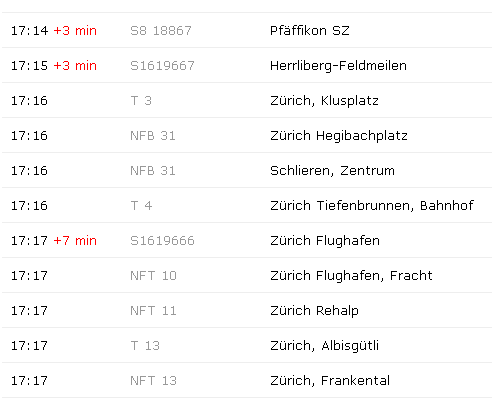
See the next departures from your station.

Parameters of Stationboard Macro

Name

Description

Type

This is a required field

Default

station


string

https://communardo.atlassian.net/wiki/s/626371833/6452/634cf7c37efa7b4eab54b193b5c882fc93d0b2af/_/images/icons/emoticons/error.png


Name of the station
id

Enter the name of the station from which the next connections will be displayed.

string

https://communardo.atlassian.net/wiki/s/626371833/6452/634cf7c37efa7b4eab54b193b5c882fc93d0b2af/_/images/icons/emoticons/check.png


Limit results
limit

How many entries you like to see?

int

https://communardo.atlassian.net/wiki/s/626371833/6452/634cf7c37efa7b4eab54b193b5c882fc93d0b2af/_/images/icons/emoticons/error.png

15

Change Station
showSearchBox

Possibility to change the station.

boolean

https://communardo.atlassian.net/wiki/s/626371833/6452/634cf7c37efa7b4eab54b193b5c882fc93d0b2af/_/images/icons/emoticons/error.png

false


Example

image2013-12-3 17:16:54.png
image2013-12-3 17:16:37.png


Connections Macro


Search for SBB connections

Parameters

Name

Description

Type

This is a required field

Default

From station
id


string

https://communardo.atlassian.net/wiki/s/626371833/6452/634cf7c37efa7b4eab54b193b5c882fc93d0b2af/_/images/icons/emoticons/error.png


station


string

https://communardo.atlassian.net/wiki/s/626371833/6452/634cf7c37efa7b4eab54b193b5c882fc93d0b2af/_/images/icons/emoticons/error.png


Destination
to-id

Enter a preset destination.

string

https://communardo.atlassian.net/wiki/s/626371833/6452/634cf7c37efa7b4eab54b193b5c882fc93d0b2af/_/images/icons/emoticons/error.png


to


string

https://communardo.atlassian.net/wiki/s/626371833/6452/634cf7c37efa7b4eab54b193b5c882fc93d0b2af/_/images/icons/emoticons/error.png


Show the from field
editFrom

Show the from field to change the departure station.

boolean

https://communardo.atlassian.net/wiki/s/626371833/6452/634cf7c37efa7b4eab54b193b5c882fc93d0b2af/_/images/icons/emoticons/error.png

true

Show the destination field
editDestination

Show the destination field to change the station.

boolean

https://communardo.atlassian.net/wiki/s/626371833/6452/634cf7c37efa7b4eab54b193b5c882fc93d0b2af/_/images/icons/emoticons/error.png

true

Change Date & Time
editDate


boolean

https://communardo.atlassian.net/wiki/s/626371833/6452/634cf7c37efa7b4eab54b193b5c882fc93d0b2af/_/images/icons/emoticons/error.png

true

set departure or arrival box
editDepartureOrArrival


boolean

https://communardo.atlassian.net/wiki/s/626371833/6452/634cf7c37efa7b4eab54b193b5c882fc93d0b2af/_/images/icons/emoticons/error.png

true

Floating input form
formFloat

If deactivated, after each input group is a line break.

boolean

https://communardo.atlassian.net/wiki/s/626371833/6452/634cf7c37efa7b4eab54b193b5c882fc93d0b2af/_/images/icons/emoticons/error.png

true

Width of the input form.
formWidth

The width in pixel.

int

https://communardo.atlassian.net/wiki/s/626371833/6452/634cf7c37efa7b4eab54b193b5c882fc93d0b2af/_/images/icons/emoticons/error.png


Width of the result container.
resultsWidth

The width in pixel.

int

https://communardo.atlassian.net/wiki/s/626371833/6452/634cf7c37efa7b4eab54b193b5c882fc93d0b2af/_/images/icons/emoticons/error.png


Autoload
autoload

If the departure and the destination is configured, the connections are loaded after the page is ready.

boolean

https://communardo.atlassian.net/wiki/s/626371833/6452/634cf7c37efa7b4eab54b193b5c882fc93d0b2af/_/images/icons/emoticons/error.png

false


Data Center customers

The Data Center approval process has become increasingly complex and expensive, while we continue to offer this app for free. That’s why we have decided not to list it for Data Center in the Atlassian Marketplace anymore.

  • If you have an existing Data Center installation, you can continue using it.

  • If you want to install the app on Data Center now, you can use the server version.


Support

Support Portal