
Track specific components of your Confluence, including user profiles, team pages, the space directory and content from 3rd-party apps.
Accessing the Confluence URL Reports
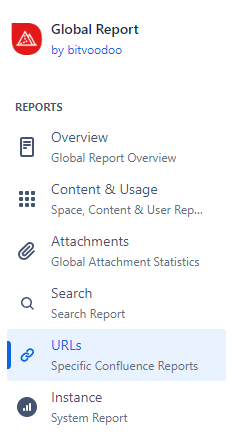
In the Viewtracker menu, select the new entry “URLs / Specific Confluence Reports.”
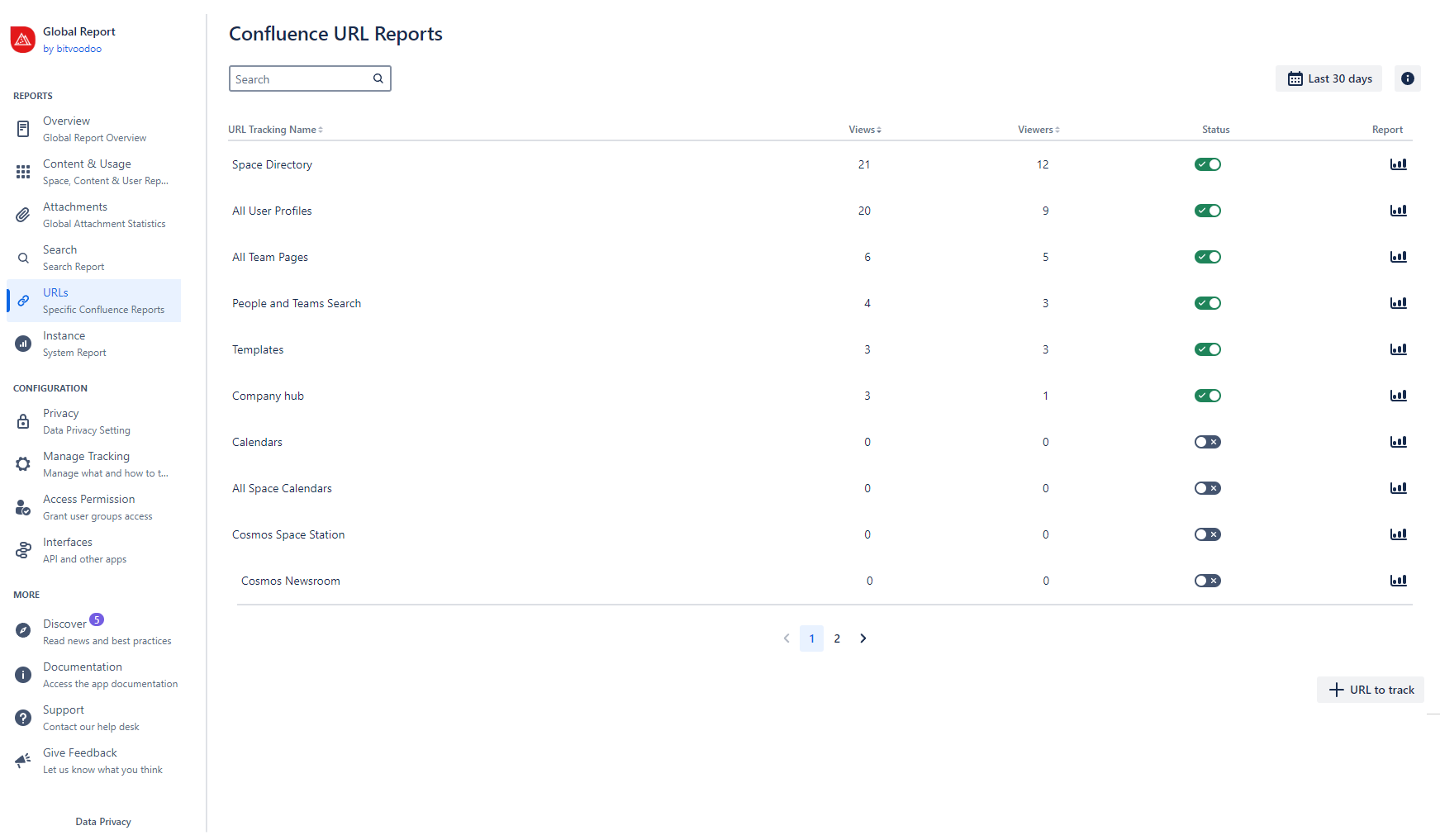
This will give you a table of all specific Confluence reports. The metrics refer to the last 30 days, which is the default setting. You can change the date range by tapping “Last 30 days” field.
You can use the search field to filter the reports.
Elements of the Confluence URL Reports
Each report consists of the following elements.
-
URL Tracking Name:
|
Name |
Detail & How to access |
URL or Regex |
|---|---|---|
|
All Team Pages This app has been discontinued September 2025.
|
All team pages views accumulated Access via header: Teams → search people and teams → choose any team |
https://***.atlassian.net^\/wiki\/people\/team\/[^/]{10,128}$ |
|
All User Profiles This app has been discontinued September 2025.
|
All user profile views accumulated Access via click on the user’s avatar or by searching for the desired user in the header under Teams and calling up their profile. |
https://***.atlassian.net^\/wiki\/people\/[^\/]{10,128}$ |
|
Space Directory |
Overview of all spaces in your Confluence instance Access via header: Spaces → See all spaces |
https://***.atlassian.net^\/wiki\/spaces(|\?.|#.)$ |
|
People and Teams Search This app has been discontinued September 2025.
|
Search for people and teams Access via header: Teams → search people and teams |
https://***.atlassian.net^\/wiki\/people\/search.* |
|
Templates |
Overview of all Templates Access via header: Templates |
https://***.atlassian.net^\/wiki\/templates(|\?.|#.)$ |
|
Calendars |
Main calendar (if activated) Access via header (if the feature is activated): Calendars |
https://***.atlassian.net^\/wiki\/mycalendar(|\?.|#.)$ |
|
All Space Calendars |
Space calendar views accumulated |
https://***.atlassian.net^\/wiki\/spaces\/[~a-zA-Z0-9_-]+\/calendars(|\?.|#.)$ |
|
Company Hub |
Tracks all Company Hub views accumulated. |
https://***.atlassian.net^\/wiki\/company-hub(|\?.*|#.*)$ |
|
All Whiteboards |
Whiteboard views accumulated |
https://***.atlassian.net/wiki/spaces/[^/]+/whiteboard/[^/]+ |
|
All Databases |
Databases views accumulated |
https://***.atlassian.net/wiki/spaces/[^/]+/database/[^/]+ |
|
All Smart Links |
Smart Links views accumulated |
https://***.atlassian.net/wiki/spaces/[^/]+/embed/[^/]+ |
|
Linchpin Enterprise News This app has been discontinued February 2024 |
For tracking the Linchpin Enterprise News app interface access |
https://***.atlassian.net/wiki/***/news-hub |
|
Linchpin User Profiles This app has been discontinued February 2024 |
For tracking the Linchpin User Profiles app interface access |
https://***.atlassian.net/wiki/***/contact-page |
|
Cosmos Space Station |
For tracking the Cosmos app’s Space Station interface access |
https://***.atlassian.net^\\/wiki\\/plugins\\/servlet\\/ac\\/com\\.caelor\\.confluence\\.cloud\\.cosmos\\/caelor-cosmos-portal.*ac\\.cosmosPage=space.*$ |
|
Cosmos Newsroom |
For tracking the Cosmos app’s Newsroom interface access |
https://***.atlassian.net^\\/wiki\\/plugins\\/servlet\\/ac\\/com\\.caelor\\.confluence\\.cloud\\.cosmos\\/caelor-cosmos-portal.*ac\\.cosmosPage=news.*$ |
|
Cosmos People Network |
For tracking the Cosmos app’s People Network interface access |
https://***.atlassian.net^\\/wiki\\/plugins\\/servlet\\/ac\\/com\\.caelor\\.confluence\\.cloud\\.cosmos\\/caelor-cosmos-portal.*ac\\.cosmosPage=people.*$ |
|
Cosmos Dashboard |
For tracking the Cosmos app’s Dashboard interface access |
https://***.atlassian.net^\\/wiki\\/plugins\\/servlet\\/ac\\/com\\.caelor\\.confluence\\.cloud\\.cosmos\\/caelor-cosmos-portal\\??(?:(?!ac\\.cosmosPage=).)*$|^\\/wiki\\/plugins\\/servlet\\/ac\\/com\\.caelor\\.confluence\\.cloud\\.cosmos\\/caelor-cosmos-portal.*(?:ac\\.cosmosPage=dashboard).*$ |
|
Mantra Dashboard |
For tracking the Mantra app’s dashboard access
|
https://***.atlassian.net^\\/wiki\\/apps\\/***\\/***\\/mantra\\/workspaces\\/[^/]+\\/dashboard$ |
|
Mantra News |
For tracking the Mantra app’s news access |
https://***.atlassian.net^\\/wiki\\/apps\\/***\\/***\\/mantra\\/workspaces\\/[^/]+\\/news$ |
|
Mantra Posts |
For tracking the Mantra app’s posts access |
https://***.atlassian.net^\\/wiki\\/apps\\/***\\/***\\/mantra\\/workspaces\\/[^/]+\\/posts$ |
|
Mantra Events |
For tracking the Mantra app’s events access |
https://***.atlassian.net^\\/wiki\\/apps\\/***\\/***\\/mantra\\/workspaces\\/[^/]+\\/events$ |
|
Mantra Social Wall |
For tracking the Mantra app’s social wall access |
https://***.atlassian.net^\\/wiki\\/apps\\/***\\/***\\/mantra\\/workspaces\\/[^/]+\\/social-wall$ |
|
Mantra E-Learning |
For tracking the Mantra app’s e-learning access |
https://***.atlassian.net^\\/wiki\\/apps\\/***\\/***\\/mantra\\/workspaces\\/[^/]+\\/smart-courses$ |
|
Mantra Settings |
For tracking the Mantra app’s settings access |
https://***.atlassian.net^\\/wiki\\/apps\\/***\\/***\\/mantra\\/workspaces\\/[^/]+\\/settings\\/design$ |
|
Mantra Communities |
For tracking the Mantra app’s communities access |
https://***.atlassian.net^\\/wiki\\/apps\\/***\\/***\\/mantra\\/communities$ |
|
Mantra People |
For tracking the Mantra app’s people access |
https://***.atlassian.net^\\/wiki\\/apps\\/***\\/***\\/mantra\\/people-directory$ |
-
Views: The accumulated visits of a specific report in the selected date range. Tap the bar chart icon 📊 in the “Report” column for a detailed view.
-
Viewers: The Confluence users who accessed a specific Confluence component in the selected date range.
-
Status: Tracking all the specific Confluence reports is disabled by default. An administrator or a user with the necessary permission can use the toggle in the “Status” column to activate tracking for a specific report.
-
Report: Tapping the bar chart icon 📊 will open a detailed view of the selected report.
-
Details see below ⤵️.
-
If you are looking for a specific report not covered in this overview, please tap the “+ URL to track” button and tell us your requirements in the contact form. We will expand the URL tracking to meet customer needs.
Specific Report: Detailed view
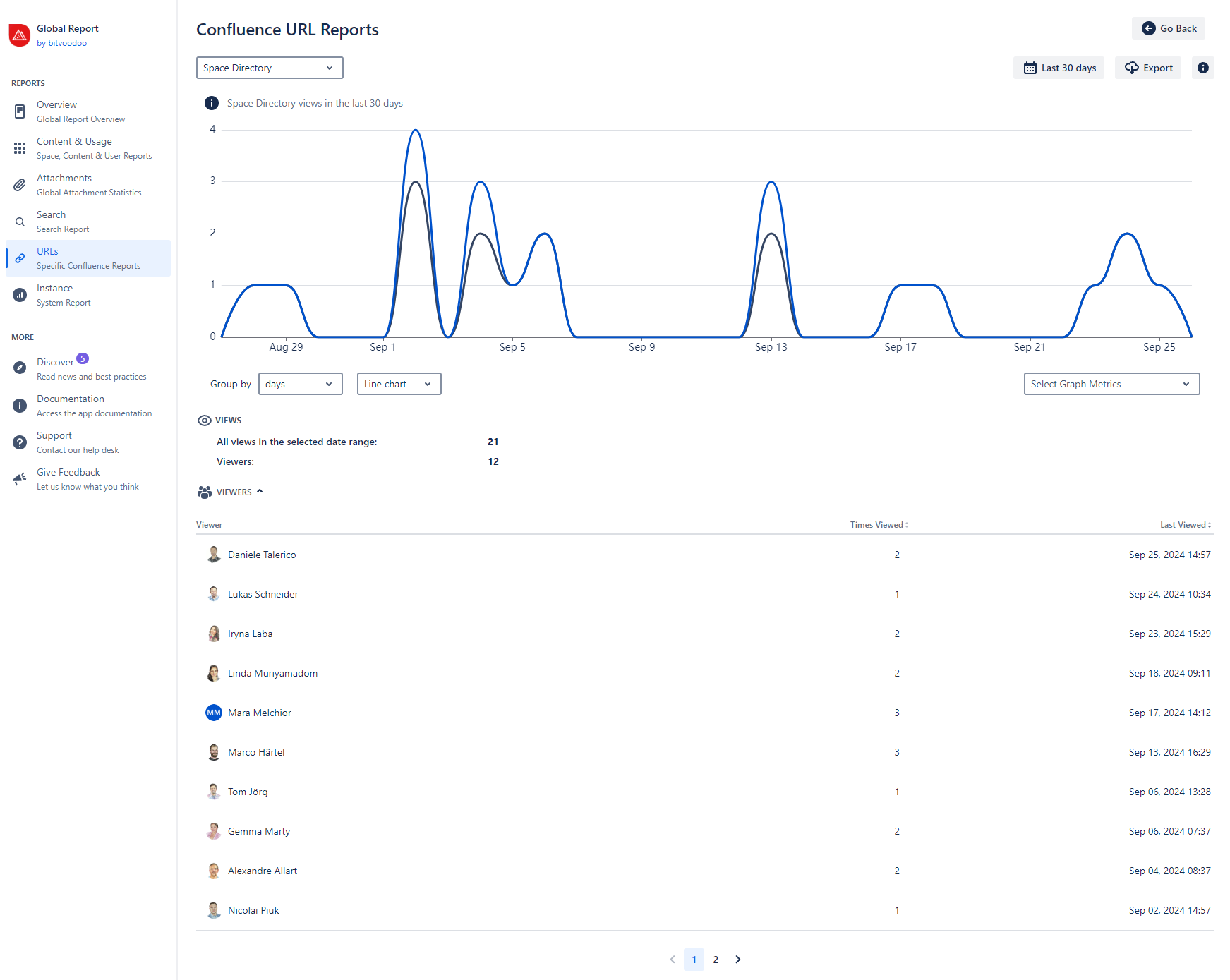
Tapping the bar chart icon 📊 will open a separate report of the specific Confluence URL. It contains the following:
-
Graph with views and viewers in the selected date range. The graph can be grouped by days, weeks, months, or years.
-
Table “views” with “all views in the selected date range” and “Viewers”
-
Table “viewers” (expandable) with the individual viewers, sorted by the number of views and the last view date.
-
Export option of this particular report (see below ⤵️ )
-
It may take up to 1 minute for views to be displayed in the report.
-
It's impossible to track anonymous users accessing specific components via URLs. This is due to technical restrictions.
-
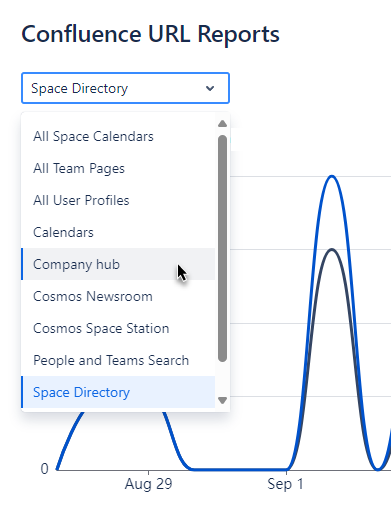
You can switch between the reports by selecting a different report in the drop-down menu.
-
You can also use the “← Go Back” button to access the URL report overview again.
Saving and sharing reports
Once you’ve changed the report's date range, the report’s URL will adapt with parameters like ?dateValue=this.week.
This is useful for the following reasons:
-
You can copy and share the URL with other administrators.
-
You can save the URL on a Confluence page or in your bookmarks to access a customized report quickly.
Exporting reports
You can export the data of each of the reports as a CSV file: Either as a list of each individual view or the aggregated views per user, as listed in the report. The aggregated data export is only available if the privacy setting allows Viewtracker to track and list individual users.
The individual view export contains: "Account Id", "Date and Time"
The aggregated view export contains: "Account Id", "Views", "Last Viewed"
Related Content
-
All Viewtracker’s built-in reports: see Built-in Reports in Viewtracker Cloud
-
Confluence URL Reports on Viewtracker Data Center
Are you looking for a specific report not covered in the list?
Please tap the “+ URL to track” button and tell us your requirements in the contact form. We will expand the URL tracking according to customer needs and collaborate with other app vendors.